Creative tools & workflows
Kling AI Pricing: Plans, Credits, Renewals and Real Video Costs
Compare Kling’s first-three-month offer, renewal prices and annual invoices. Budget accepted clips and keep app credits separate from API units.
· · Diagram Studio Editorial
In the worked app budget below, 30 accepted clips fit Kling Pro while the 100-clip estimate uses Premier 8K as its standalone allowance. The example holds generation cost and acceptance rate constant so you can see what changes the invoice. A discounted price per 100 credits tells you only part of that.
The November 25 offers below separate the first three monthly payments from renewal, show both Premier 8K and 18K, and keep app memberships separate from prepaid API packages. All prices are USD before tax.
Direct answer
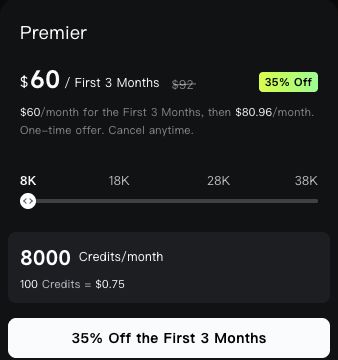
Kling Standard costs $6.50/month for the first three months, then $8.80, with 660 monthly credits. Pro costs $24, then $32.56, for 3,000 credits. Premier 8K costs $60, then $80.96. Annual Pro is $222 upfront for the first year, then $293.04/year. API packages use a separate unit balance.
Kling plans: promotional months and renewal prices
Kling’s membership page showed these offers on November 25, 2026. The monthly discount covers the first three months for eligible new purchases; renewal uses the later amount. Premier has four allowance selectors: 8K, 18K, 28K and 38K. The page opened on 18K, so selecting 8K changed both its allowance and invoice.
| Plan / selected tier | Credits per month | First three months, per month | Subsequent monthly renewal | Renewal dollars per 100 credits |
|---|---|---|---|---|
| Standard | 660 | $6.50 | $8.80 | $1.33 |
| Pro | 3,000 | $24 | $32.56 | $1.09 |
| Premier, 8K selected | 8,000 | $60 | $80.96 | $1.01 |
| Premier, 18K selected | 18,000 | $135 | $181.99 | $1.01 |
| Ultra+ | 57,000 | $402 | $544.99 | $0.96 |
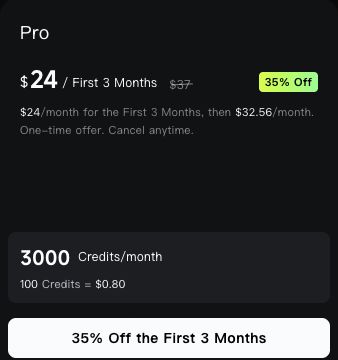
The renewal cost per 100 credits is calculated from the whole invoice divided by the allowance. For Pro it is $32.56 ÷ 3,000 × 100, or about $1.09. The card’s $0.80 uses the introductory $24 payment.
The Standard and Pro cards include subscriber generation benefits such as watermark removal and 1080p/4K access. An allowance buys generation capacity; it does not establish a fixed number of approved videos. Read the model and duration quote for the job you intend to run.
Annual prices are invoices, not monthly payment plans
Annual Pro collects $222 today for the first year, followed by a $293.04 annual renewal at the displayed offer. Its allowance remains 3,000 credits each month. The $18.50 monthly equivalent does not create an $18.50 monthly payment option.
| Plan / selected tier | First year paid upfront | Following year renewal | Renewal monthly equivalent | Credits issued per month |
|---|---|---|---|---|
| Standard | $60 | $79.20 | $6.60 | 660 |
| Pro | $222 | $293.04 | $24.42 | 3,000 |
| Premier, 8K selected | $552 | $728.64 | $60.72 | 8,000 |
| Premier, 18K selected | $1,242 | $1,639.99 | $136.67 | 18,000 |
| Ultra+ | $3,714 | $4,902.99 | $408.58 | 57,000 |
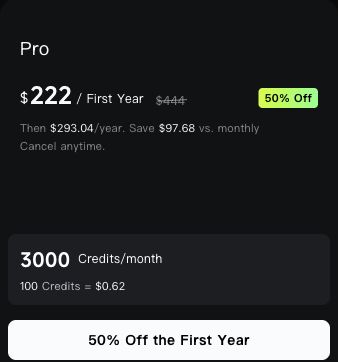
At 3,000 credits per month, an annual Pro subscription does not put 36,000 credits into the first month’s balance. A launch needing 8,000 credits immediately still exceeds that month’s included allowance.
Under the current monthly Pro offer, three $24 payments plus nine $32.56 renewals total $365.04 over twelve months. Annual Pro’s $222 saves $143.04 if you need the full year. Seven monthly payments total $202.24; eight total $234.80. The annual commitment first becomes cheaper at eight paid months under these offers.
A generation price needs a complete settings label
Choose the model version, duration, resolution, audio and reference mode before reading the generation charge. Kling 4.0’s official guide separates keyframes from Omni Reference. Adding a video reference can also change the API billing duration, as the worked example below shows.
The app budget below uses a hypothetical 40 credits per five-second attempt. It is a planning example, not a verified Kling 4.0 app quote: the live creation panel required sign-in during this check. Replace 40 with the charge shown for your selected job before purchasing a plan.
- Count every separately billed output as an attempt.
- Add image creation, extensions and upscaling when they have their own charges.
- Include completed takes rejected for creative reasons; count a technical failure as refunded only when the credits return.
Budget 10, 30 or 100 accepted clips with retries
Assume 40 app credits for each five-second attempt, two attempts for each accepted clip, and a fresh monthly allowance. That 50% acceptance rate is a planning assumption, not an observed success rate. Editing, input imagery and tax are excluded.
| Accepted clips | Attempts | Credits needed | Standalone allowance that fits | Monthly invoice: months 1–3 / renewal | Renewal cash per accepted clip |
|---|---|---|---|---|---|
| 10 | 20 | 800 | Pro, 3,000 | $24 / $32.56 | $3.26 |
| 30 | 60 | 2,400 | Pro, 3,000 | $24 / $32.56 | $1.09 |
| 100 | 200 | 8,000 | Premier 8K | $60 / $80.96 | $0.81 |
Standard’s 660 credits fall 140 short of even the 10-clip example. Pro fits both 10 and 30 clips. Buying the whole Pro month for 10 clips costs $24 initially, or $2.40 each; renewal costs $32.56, or $3.26 each. For 30 clips, the same payments become $0.80 and $1.09 per accepted clip.
At 30 clips, Pro leaves 600 credits, which fund 15 more attempts at 40 credits each. The used 2,400 credits have an allocated value of $26.05 at renewal ($32.56 × 2,400 ÷ 3,000). The actual invoice remains $32.56; treating that allocation as the purchase price understates the cash required.
For 100 accepted clips, Premier 8K covers exactly 200 attempts at this input. Its $60 introductory invoice is $0.60 per accepted clip; renewal is about $0.81 each. There are no included credits left for additional takes. Premier 18K also fits, but its $135 first-three-month invoice and $181.99 renewal buy 10,000 more credits than this batch uses.
Pro plus top-ups is another route to 8,000 credits. Its 5,000-credit gap needs enough whole packs to cover it. At renewal, the pack total must be less than $48.40 to beat Premier 8K’s $80.96 invoice ($80.96−$32.56). Use the current pack quote and any model-access requirements in that comparison.
Acceptance rate decides whether the same plan still fits
At 40 credits per attempt, Pro’s 3,000 credits fund 75 attempts. Getting 30 accepted clips from that allowance requires at least 40% acceptance. At 50%, you use 60 attempts and leave 15; at 25%, you need 120 attempts and 4,800 credits, which exceed Pro by 1,800.
| Accepted attempts | Attempts to budget | Credits needed | Pro balance or shortfall |
|---|---|---|---|
| 80% | 38 | 1,520 | 1,480 left |
| 50% | 60 | 2,400 | 600 left |
| 40% | 75 | 3,000 | Exactly fits |
| 25% | 120 | 4,800 | 1,800 short |
For a product ad, define acceptance before the pilot: the product keeps its shape, the required label is readable, and the requested motion lasts through the final crop. If only four of ten representative takes pass, the 40% row is the useful starting point. Separate later client revisions from model retries so they have their own reserve.
API pricing: units, prepaid packs and reference-video duration
Kling’s official API pricing page sells prepaid units separately from app membership. On November 25, the Flagship 180-Day tab listed $500 for 3,250 units, $2,000 for 13,135, or $8,000 for 53,640. These packages apply to Kling 4.0 and 4.0 Flash, allow 20 concurrency, and expire after 180 days without rollover or extension.
| Workflow | 720p | 1080p | 4K | Billable duration |
|---|---|---|---|---|
| Kling 4.0, no input video | 1 unit/s | 1.5 units/s | 3.5 units/s | Output seconds |
| Kling 4.0, with input video | 0.6 units/s | 0.9 units/s | 2.1 units/s | 2 × output if input ≤ output; otherwise input + output |
| Kling 4.0 HDR surcharge | Unavailable | +0.3 units/s | +0.5 units/s | Output seconds |
| Kling 4.0 Flash, no input video | 0.6 units/s | Not listed | Not listed | Output seconds |
The package selection and rate table must travel together. Do not apply an old dollar-per-unit assumption to a new package. With the $500 / 3,250-unit pack, the purchased unit allocation is about $0.153846. A five-second 1080p Kling 4.0 job with no input video requires 7.5 units, or about $1.15 of that pack.
For a three-second input video and five-second output at 1080p, input duration is shorter than output duration. Billing uses twice the output duration: 10 seconds × 0.9 units, or 9 units. Reference-video billing therefore depends on both the input and output lengths.
For a five-second 1080p output with ten seconds of reference video, the 0.9-unit rate applies to 15 billable seconds: 13.5 units. Without a video reference, five seconds at 1.5 units costs 7.5 units. The lower reference-workflow rate therefore produces the larger bill in this example. HDR would add another 1.5 units for the five-second 1080p output.
The $9 API trial is smaller and expires sooner
The Flagship Trial tab showed two first-purchase offers: $9 for 64 units and $90 for 637 units. Both list 30-day validity, no rollover or extension, and five concurrency. The cards also say 10% off the first buy and a maximum of five purchases. Check your remaining eligibility; multiplying the discounted first-purchase price by several packs assumes a discount the card does not promise.
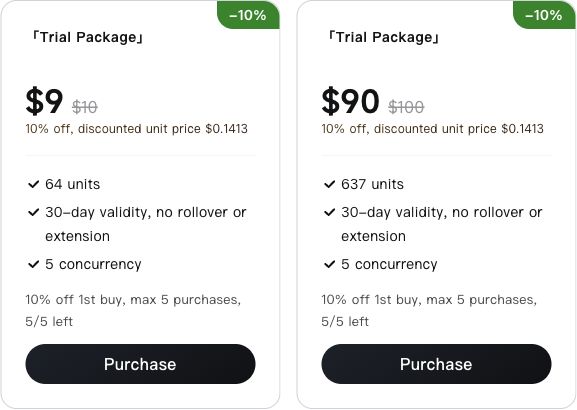
At 7.5 units for each five-second 1080p Kling 4.0 attempt without input video or HDR, the 64-unit trial funds eight complete attempts and leaves four units. At the illustrative two-attempts-per-accepted-clip ratio, that is four accepted clips. It cannot cover the ten-clip target by itself.
The 637-unit trial funds 84 complete attempts and leaves seven units. It has room for the 60-attempt, 30-clip planning example below, but the work must fit its 30-day lifetime. The 180-day pack gives a longer usage window and more concurrency at a larger cash commitment.
API budgets for 10, 30 and 100 accepted clips
Use five-second 1080p Kling 4.0 without input video or HDR: 7.5 API units per attempt. Budget two attempts for each accepted clip. The table chooses one displayed pack that covers each batch; smaller-pack combinations can have a different cash total and must use their actual repeat-purchase quotes.
| Accepted clips | Attempts / units consumed | Selected pack | Allocated usage value | Whole pack invoice |
|---|---|---|---|---|
| 10 | 20 / 150 | Trial: 637 units | $21.19 | $90 first buy |
| 30 | 60 / 450 | Trial: 637 units | $63.58 | $90 first buy |
| 100 | 200 / 1,500 | 180-day: 3,250 units | $230.77 | $500 |
For 30 clips, 450 units use $63.58 of the $90 / 637-unit trial by proportional allocation. Buying that pack still costs $90, or $3 per accepted clip for this batch, with 187 units left to use before expiry. For 10 clips, the same single-pack purchase costs $9 per accepted clip, even though the used units allocate to $21.19 in total.
For 100 clips, the selected $500 pack leaves 1,750 units after the 1,500-unit estimate. The full job’s cash cost is $5 per accepted clip if the remaining units go unused. Multiple trial packs may cost less, but their purchase limits, repeat prices and 30-day expiry need to fit the job. The table does not claim $500 is the cheapest possible combination.
API units and app credits have different meters. The API rates in this section are verified model-specific rates; the 40-credit app example is a hypothetical input. Those two tables cannot establish that the same Kling job costs less on one surface.
Choose keyframes or video references before budgeting
FILM CRUX’s Kling 4.0 walkthrough shows keyframe animation around 0:57, then Omni Reference around 1:20. Use it to distinguish still images that define moments from uploaded footage that guides motion. The official API’s input-video duration rules apply when video is part of the request.
For a product rotating through three planned views, start by deciding whether still keyframes are enough or a motion-reference clip is needed. For the API example above, adding ten seconds of reference footage raises the five-second output from 7.5 to 13.5 units before HDR. Include that choice in the budget before multiplying by retries.
Credit expiry and automatic charges can change the decision
Kling’s credits policy lists regular subscription credits as valid for one month after distribution and separately purchased credits as valid for two years. Promotional credits follow their displayed event rules. Plan the usage period as well as the total count: expiring monthly credits are not a long-term stockpile.
The same policy distinguishes credit access from membership privileges. A purchased balance does not by itself establish access to every paid feature. Check resolution, watermark removal and commercial-use conditions against the membership you will hold when generating and delivering the work.
Kling’s paid-service terms distinguish membership automatic renewal from credit auto-recharge. One can renew your plan; the other can buy more credits when a configured threshold is crossed. Review both settings and any monthly recharge limit. Turning off a plan renewal should not be assumed to cancel a separate recharge arrangement.
Which Kling payment fits your next job?
For a short app project, choose the monthly allowance after reading the exact generation quote. At the stated 40-credit input, Pro covers the 10- and 30-clip estimates. The 100-clip estimate exactly fills Premier 8K; plan a reserve or compare top-ups if you expect further revisions.
For recurring Pro work, the current annual offer becomes cheaper than monthly billing at eight paid months. A one-off month still costs $24 initially, compared with a $222 annual payment. Unused future months do not help a project that ends next week.
For an API pilot, the $9 trial can test up to eight of the specified five-second attempts; a 30-clip estimate fits the $90 trial at the stated acceptance ratio. Choose the 180-day package when its larger balance, longer lifetime or concurrency is useful to the workload, then compare available pack combinations.
If you are buying Kling through a multi-model platform, use the Higgsfield pricing comparison alongside the official Kling membership and API package pages. Match model, duration, resolution, references and billing surface before comparing the payment.