Narrative systems
Turn a static diagram into a product story people can follow
A product story is not a system diagram with movement added. It is a designed sequence of attention that helps one audience understand one meaningful change.
· · Diagram Studio Editorial
Direct answer
A static diagram becomes a product story when you reorganize it around one change in the viewer’s understanding. Write the sentence the viewer should be able to complete, identify the gap between the current and better state, remove information that does not change the explanation, guide one reveal, replay it at delivery size, and preserve the last frame as a clear PNG.
A product story is a sequence of attention
A system diagram and a product story are related in the way a map and a guided walk are related. The map preserves the territory. The walk chooses a route for a person with a destination.
A static diagram says, “Here is the system.” A product story says, “Here is the part of the system that changes something for this person.” That shift changes nearly every editorial decision.
The usual mistake is to animate the diagram before choosing the story. Boxes move, arrows travel, and the canvas feels busier, but the viewer still has to decide what matters. Motion has increased activity without reducing interpretation.
A system diagram is usually organized around completeness. It records components, integrations, boundaries, data stores, ownership, exceptions, and dependencies. A product story is organized around comprehension. It selects enough of the system to help one audience understand one meaningful change.
Simplification is not the same as dumbing something down. A good product story does not deny complexity. It changes when the audience encounters it. The opening diagram carries the main idea; deeper architecture, edge cases, and evidence remain available when the reader needs to inspect them. The story should be narrow, not shallow.
- A buyer may need to see how a request becomes an approved answer.
- A security reviewer may need to see where data crosses a boundary and where policy is enforced.
- A new engineer may need to see which service owns a retry after failure.
The infrastructure may be identical. The story is not. Audience changes relevance.
Start with a sentence, not an effect
Before touching Animate, complete one sentence. Naming the viewer prevents a generic explanation; naming one change prevents several stories from competing for the same frame.
| Version | Sentence | What it changes |
|---|---|---|
| Weak | People should understand our AI platform. | No audience, decision, or finish line. |
| Support | A support leader can explain how an urgent ticket gets a fast draft without bypassing agent approval. | Protects speed and control. |
| Engineering | An engineering lead can explain where a failed deployment is stopped and who can trigger rollback. | Centers failure ownership. |
| Customer | A customer can explain why the assistant asks for human review before a high-risk action. | Makes the trust boundary visible. |
This sentence is not headline copy. It is an editorial test. Every object, label, arrow, and motion choice should help the viewer complete it.
Find the gap that creates the story
Facts become a story when they are arranged around a meaningful difference. In product communication, that difference is often the gap between a current condition and a better possible condition.
- A request waits in a shared queue; then urgent work is identified.
- A user repeats context across handoffs; then the context follows the case.
- An AI draft appears opaque; then the human control and evidence path become visible.
- A deployment fails silently; then the rollback owner and recovery path become clear.
Presentation expert Nancy Duarte uses contrast between “what is” and “what could be” to explain how communicators create tension and movement. Her pattern is useful here, with one adjustment: a product diagram must also show the intervention and the constraint. “Before” and “after” alone can become marketing theatre.
| Beat | Question it answers |
|---|---|
| Current context | Where are we starting? |
| Friction or risk | What makes the current state insufficient? |
| Product intervention | What changes the route or decision? |
| Control or boundary | Why should the viewer trust the result? |
| Observable result | What is different at the end? |
For an urgent-ticket story, the tension is not “support is bad, AI is good.” It is more specific: manual triage can delay an urgent request; automated classification can prepare a draft sooner; agent approval remains the control before the customer receives it.
Use cognitive science as an editing discipline
“Storytelling” can sound subjective, so it helps to connect the editing decisions to what research actually supports. The point is not to decorate the explanation with brain language. It is to make better cuts.
Paul Chandler and John Sweller’s work on cognitive load and instructional format argues that instructional material should direct cognitive resources toward relevant learning instead of forcing people to perform avoidable integration work. Their experiments also found that seemingly useful but nonessential explanatory material could interfere.
The practical implication is modest but valuable: do not make the viewer reconcile five channel icons, a detached legend, three naming systems, and a moving route before they can understand the main handoff. Place a short label near the object it explains. Collapse equivalent entry points. Remove a metric if it does not alter the decision being shown.
Richard Mayer’s 2017 review, Using multimedia for e-learning, summarizes research-based principles including coherence, signaling, and segmenting. They translate into specific diagram edits.
| Research principle | Diagram editing move | Failure to avoid |
|---|---|---|
| Coherence: remove extraneous material | Delete objects that do not change the viewer’s answer. | Keeping every feature because the team built it. |
| Signaling: highlight essential organization | Emphasize the active route, decision, or control. | Making every node equally loud. |
| Segmenting: break an explanation into parts | Reveal one meaningful beat at a time. | Playing several unrelated changes simultaneously. |
The Cambridge Handbook’s signaling chapter is careful about boundary conditions; cueing is not a command to add highlights everywhere. A signal works because it creates a difference. If five objects pulse, none of them is the signal.
Barbara Tversky, Julie Bauer Morrison, and Mireille Bétrancourt reviewed the evidence in Animation: can it facilitate?. Their caution still matters: animated graphics have not been reliably superior to well-designed static graphics. Useful motion needs to make the relevant change easier to perceive and understand.
Use the SIGNAL framework
SIGNAL is a Diagram Studio editorial method for turning the principles above into a working sequence. It is a checklist, not a psychological test.
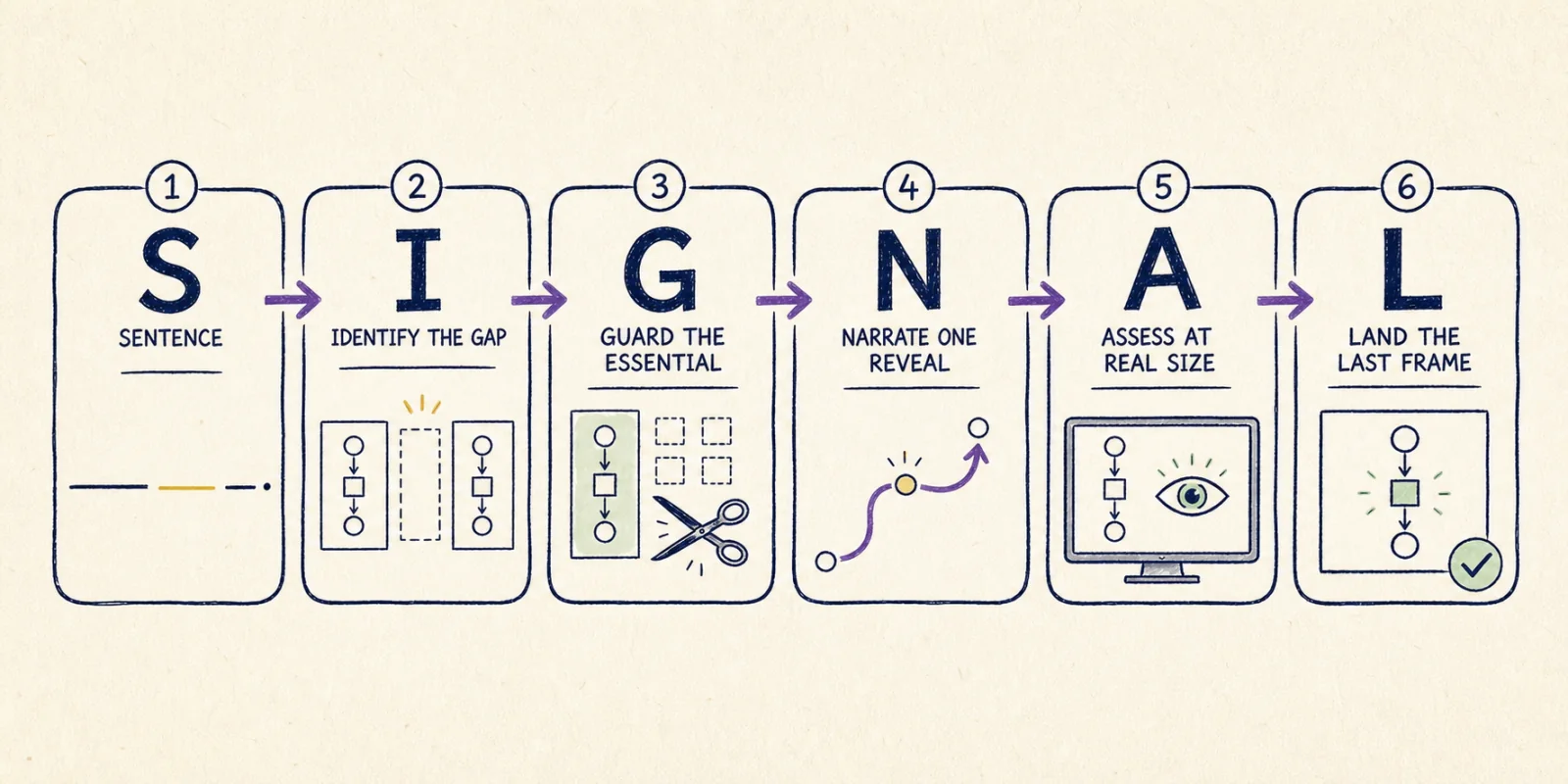
| Step | Decision | Stop condition |
|---|---|---|
| S — Sentence | Write what a specific viewer should be able to explain. | The sentence names one audience and one outcome. |
| I — Identify the gap | Name the meaningful difference between current and better state. | The contrast is concrete, not theatrical. |
| G — Guard the essential | Cut aggressively while protecting the control or constraint. | The claim remains honest after simplification. |
| N — Narrate one reveal | Choose one visual job: route, assembly, or focus. | The motion has one reason to exist. |
| A — Assess at real size | Replay where the asset will actually appear. | Labels and direction work at delivery width. |
| L — Land the last frame | Preserve the completed diagram as a reference. | The PNG remains understandable without motion. |
The order matters. Teams often begin at N because animation feels like the creative step. The quality of N is mostly determined by S, I, and G.
Worked example: turn an urgent-support system into one story
Imagine an existing support architecture with email, chat, web forms, an ingestion service, language detection, sentiment scoring, an urgency classifier, knowledge retrieval, an AI drafting service, a policy check, an agent workspace, CRM sync, SLA analytics, and reporting. That diagram may be accurate. It is not yet a product story.
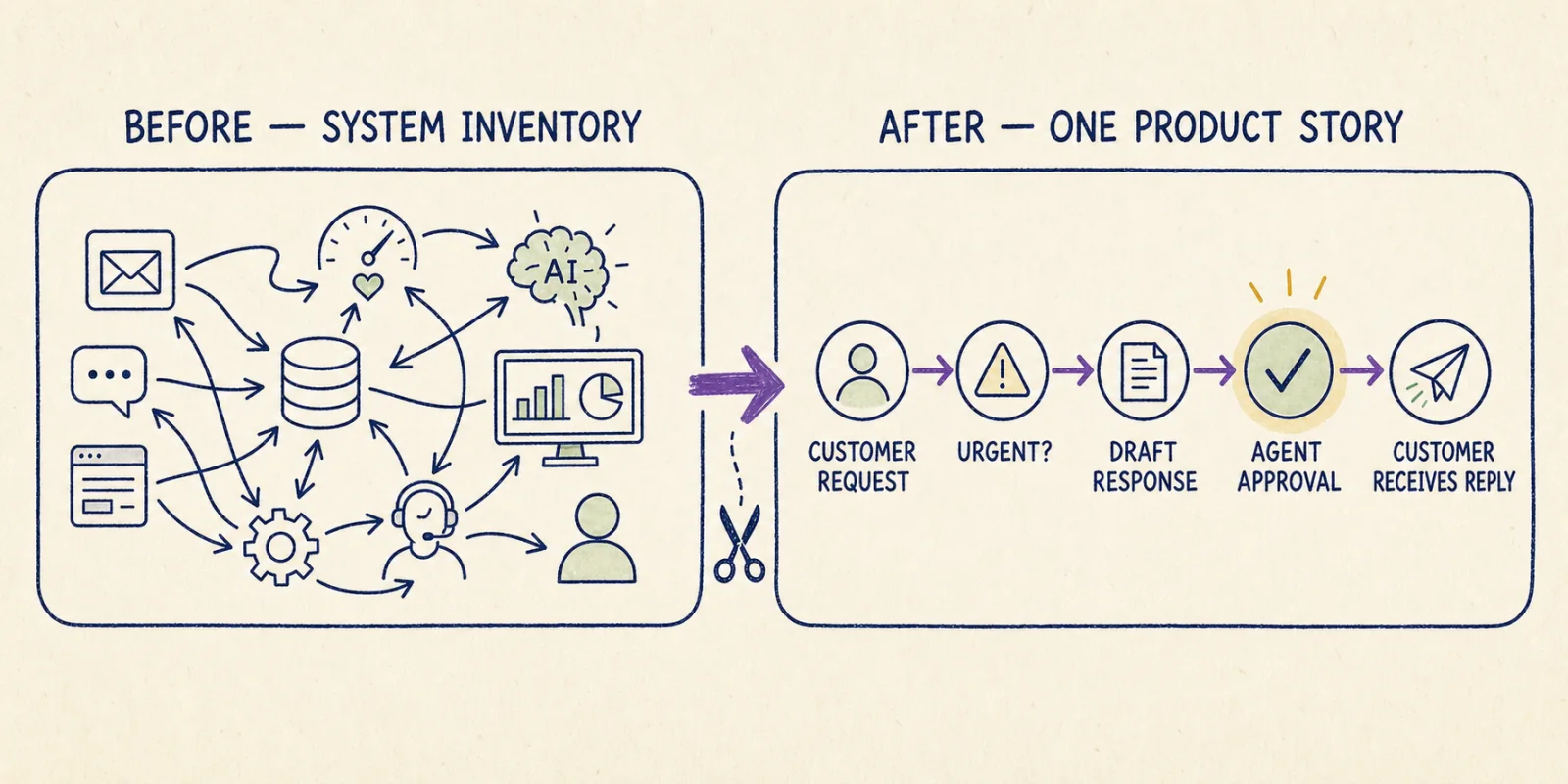
The current state is specific: an urgent request can wait for manual discovery in a mixed queue. The better state is equally specific: urgency is identified, a response is prepared, and the agent retains approval before anything reaches the customer.
Human approval is not clutter. It is the control that makes the speed claim credible. Remove it and the story changes from “faster assisted response” to “unsupervised automated response.”
| Original object | Product-story edit | Why |
|---|---|---|
| Email, chat, and web form | Merge into “Customer request” | Channel does not change this explanation. |
| Language and sentiment steps | Remove from this version | They do not determine the promised outcome. |
| Urgency classifier | Keep as “Urgent?” | This is where the route changes. |
| Retrieval and generation services | Merge into “Draft response” | The buyer needs the action before the internals. |
| Policy check and agent workspace | Express as “Agent approval” | This preserves the visible control. |
| CRM, analytics, and SLA reporting | Remove | They belong in reporting and operations stories. |
Then edit the canvas. Shorten labels. Check the route direction. Move supporting detail out of the main path. A good prompt gives you a focused first draft; it does not replace editorial judgment.
Choose one Diagram Studio reveal
Open Animate only after the still works. Diagram Studio intentionally offers a small set of preset styles rather than a keyframe or timeline editor.
For the urgent-ticket route, start with Arrow motion and choose “One by one.” The nodes remain stable while the route becomes visible. Use Replay to confirm that canvas element order matches the intended explanation.
| Viewer needs to… | Use | Editorial note |
|---|---|---|
| Follow a handoff or sequence | Arrow motion | Keep the map stable; reveal the connections. |
| See a system assembled by region | Build parts | Arrange the canvas in a meaningful reading order first. |
| Notice a risk, approval, or exception | Focus selected | Select the object that carries the decision. |
| Watch the drawing establish a mental model | Sketch draw | Reveal only the elements that matter when useful. |
| Add light hand-drawn presence | Soft wiggle | Use after comprehension is already solved. |
If the explanation depends on moving, adding, or deleting objects on the canvas, plan it as a four-beat Free flow recording. If you are uncertain which preset fits, use the motion-choice guide.
Replay for comprehension, persuasion, and durability
Do not ask only, “Does this look good?” That question is too easy to satisfy. Review the story in three layers.
| Layer | Test | Question |
|---|---|---|
| Comprehension | Orientation | Can the viewer find the starting point immediately? |
| Comprehension | Mute | Can the route be followed without narration? |
| Comprehension | Retell | After one replay, can someone describe the route in one sentence? |
| Persuasion | Gap | Is the current problem concrete rather than theatrical? |
| Persuasion | Control | Is the approval, boundary, or exception that makes the claim credible visible? |
| Persuasion | Outcome | Does the last object show an observable result? |
| Durability | Delivery size | Are labels readable at the real blog, slide, or message width? |
| Durability | Final frame | Does the completed diagram work without animation? |
| Durability | Color | Can success, failure, and ownership be understood without color alone? |
Ask someone outside the project team to complete the original sentence. If they give you a different story, do not add narration. Edit the diagram.
Export the explanation and the reference
Export an Animated GIF when reveal order teaches something the still cannot. Export a PNG for scanning, documentation, accessibility fallbacks, and contexts where motion will not play.
| Asset | Job | Quality check |
|---|---|---|
| Animated GIF | A guided first pass through the route or decision. | The reveal is understandable without narration. |
| PNG | A durable mental model for inspection and reference. | The final frame preserves labels, ownership, controls, and outcome. |
Finish when the viewer can explain the intended change, see the control that makes it credible, and inspect the final frame without motion. More movement after that point does not add story. It adds distance between the viewer and the idea.