AI design skills
Claude Design Skills: What They Are, Where Good Ones Come From, and How to Judge Them
What a SKILL.md is, where design skills come from, what Anthropic does and does not say about Claude Design and skills, and how to test one fairly.
· Diagram Studio Editorial
Direct answer
A Claude design skill is a folder with a SKILL.md file of design instructions that Claude loads on demand when a request matches its description. Judge one by provenance, specificity, negative constraints, token naming and test evidence, then compare it against a no-skill baseline on your own briefs. No public benchmark ranks design skills.
What a Claude design skill is
A skill is a folder whose required file is SKILL.md: YAML frontmatter followed by markdown instructions. Anthropic's documentation lists two required frontmatter fields. name can be at most 64 characters (lowercase letters, numbers and hyphens). description must be non-empty and at most 1,024 characters, and it should say both what the skill does and when to use it. The folder can also hold reference files and scripts. A "design skill" is simply a skill whose instructions are about visual design: typography, color, layout, tokens, components, tone of copy. (Documented: Agent Skills overview.)
What makes a skill different from pasting a prompt is how it loads. Claude sees only the name and description of every installed skill. It reads the body of SKILL.md when a request matches the description, and it reads bundled files only when the instructions point to them.
| Level | When it loads | Documented cost | What it contains |
|---|---|---|---|
| 1. Metadata | Always, at startup | About 100 tokens per skill | name and description |
| 2. Instructions | When a request matches the description | Under 5k tokens | The body of SKILL.md |
| 3. Bundled files | Only when read or run | None until accessed | Reference files, templates, scripts |
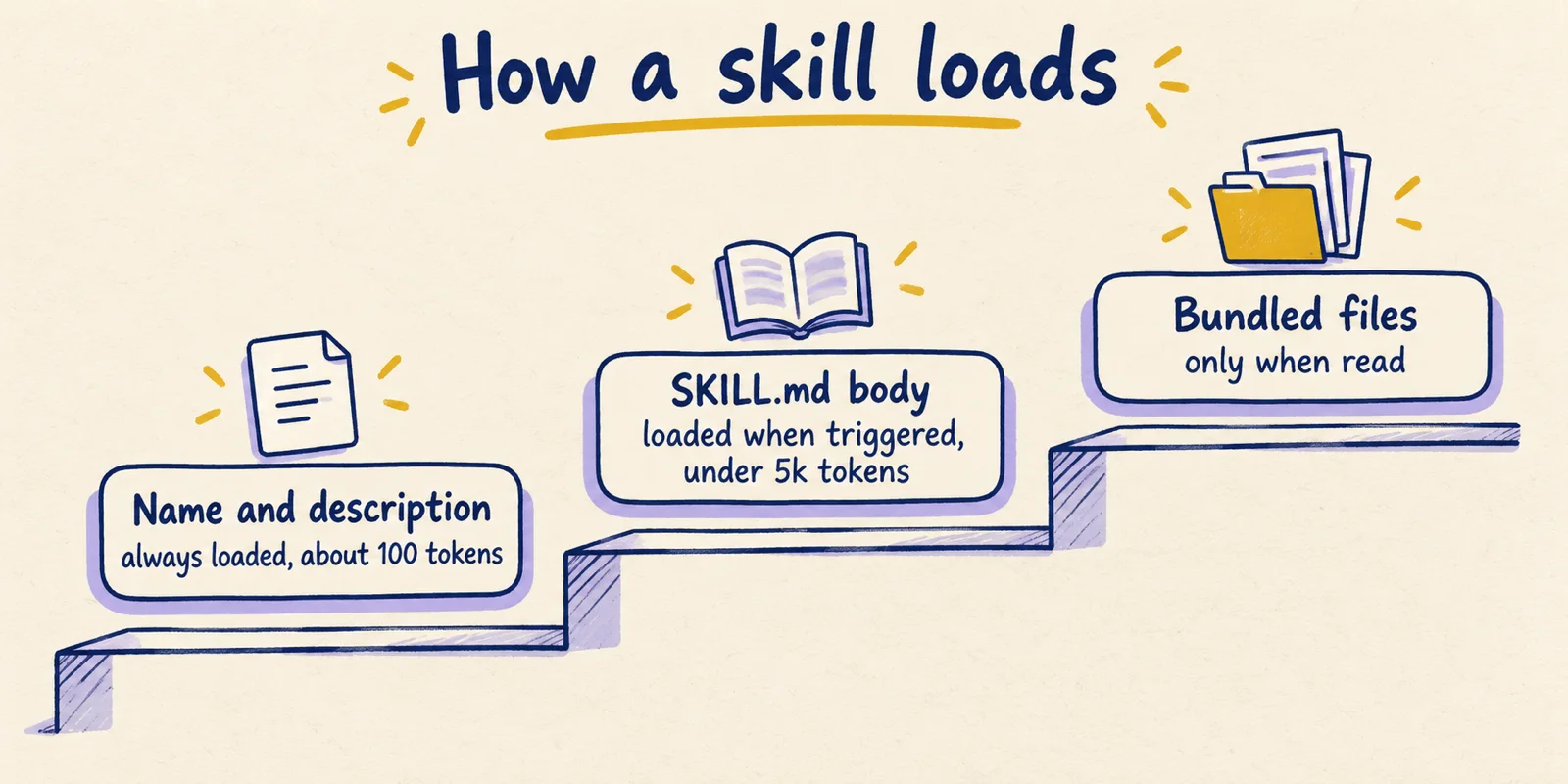
Two practical consequences follow. First, the description is the trigger. If it is vague, the skill may never load, and you will think the skill is weak when it was never read. Claude Code's documentation says the combined description and when_to_use text is cut at 1,536 characters in the skill listing, so the key use case should come first. Second, a skill is advice, not enforcement. The same documentation says that if Claude stops following a skill partway through a session, you should move critical rules into hooks or invoke the skill again. (Documented: Claude Code skills docs.)
One small discrepancy is worth knowing about. The API and claude.ai documentation call name and description required, while the Claude Code documentation says all frontmatter is optional. If you write skills for more than one surface, include both.
Where skills apply, and what Anthropic says about Claude Design
Search results use "Claude design skills" loosely, so it helps to separate three things. Claude Design is the visual workspace Anthropic announced on April 17, 2026. Claude Code is the coding agent. Skills are the folder format described above.
Per Anthropic's own pages, Claude Design builds a design system "by reading your codebase and design files," and the help center says it extracts colors, typography, components and layout patterns from codebases, decks and other uploads. It is an artifact template you can use in chat, in Claude Code (with /design and /design-sync) and from the Artifacts tab. Export options include Canva, PDF, PPTX and standalone HTML, plus a hand-off bundle for Claude Code. The announcement and both help-center articles we read do not mention skills at all. (Documented: announcement, Get started, Set up your design system.)
Where skills are documented to work: Claude Code reads them from ~/.claude/skills/ (personal) or .claude/skills/ (project). On claude.ai you upload a zip under Settings, then Features, on Pro, Max, Team and Enterprise plans with code execution enabled. Custom skills do not sync between claude.ai, the API and Claude Code, so a skill uploaded in one place is not available in the others.
So the safe reading is this. A skill you install in Claude Code shapes what Claude Code builds. Whether the Claude Design canvas itself reads your installed skills is not something Anthropic's Claude Design pages state, and this article does not assume it. Inference: the stage where a design skill most plausibly matters is implementation, after a Claude Design hand-off, when Claude Code writes the actual components. Check this in your own setup before relying on it.
As of October 1, 2026 this is what the pages say; plans, surfaces and features may have changed since.
The problem skills try to fix: distributional convergence
Anthropic's Applied AI team gave the problem a name in a November 12, 2025 post, "Improving frontend design through Skills." The argument, in their words:
During sampling, models predict tokens based on statistical patterns in training data. Safe design choices–those that work universally and offend no one–dominate web training data.
The post calls this distributional convergence: without direction the model samples from the high-probability center, which for web UI means familiar choices such as Inter with a purple gradient on white. It also gives the design principle behind its skill: write guidance "at the right altitude," avoiding both hardcoded specifics such as exact hex codes and vague guidance that assumes shared context. (Documented, as Anthropic's own explanation.)
Be clear about the strength of the evidence. The post we read shows before-and-after examples and reports no benchmark numbers or user study. That does not make the claim wrong, since anyone who has generated a few landing pages has seen the sameness. It does mean that "the skill works" is an observation from examples, which is why the protocol later in this article matters.
A second, less-discussed point: the fix can itself become a default. A third-party review from April 2026 reports that the frontend-design skill has "its own recognizable signature" (reported by dMaya, about an earlier version of the file, so treat it as a lead rather than a finding). Anthropic's current version appears to anticipate this. It lists the clusters it considers generic, and says all of them "are legitimate for some briefs, but they are defaults rather than choices."
Where design skills come from
Install counts and "best skills" lists tell you what is popular. They do not tell you who wrote a file, whether it was tested, or whether it changed after you read about it. The table sorts the sources a reader is likely to meet by what each one is and what you can actually verify.
| Source | What it is | Provenance | Label |
|---|---|---|---|
Anthropic frontend-design | One SKILL.md for distinctive UI; present in anthropics/skills and in the anthropics/claude-code plugins folder | Published by Anthropic; the two copies were byte-identical when we compared them today. The repo says its skills are for demonstration and educational purposes and should be tested before you rely on them | Documented |
| Claude Academy tutorial, "Elevate Claude's design using skills" | A walkthrough that builds a skill with five reference files, including an eight-phase elevation protocol | Anthropic's learning site; a teaching example, no author or date shown | Documented |
| Figma's guide and developer docs | How to write a skill for your own design system: library-first search, token naming, a gotchas section | Figma, with input credited to a Figma designer advocate and an Anthropic staff member | Documented |
TypeUI / awesome-design-skills | A registry of 67 design skill files (each a SKILL.md plus a DESIGN.md), pulled with npx typeui.sh pull <slug> | MIT-licensed repo by Bergside; the repo does not document how skills were made or tested. A blog on the same site is titled "48 design skills", so counts change | Reported |
awesome-claude-design | 68 DESIGN.md files modelled on well-known brands | Community repo that says its files are inspired by observable patterns, not official or endorsed | Reported |
claude-design-skill (GitHub) | A skill for HTML artifacts such as decks and prototypes | States it is adapted from an internal Claude Design system prompt. we could not verify that claim, and it is not Anthropic's own release | Unverified |
| Ranking and aggregator sites | Lists ordered by installs or by editorial taste | Counts depend on how each site measures; one review cites 565,000+ installs on Anthropic's plugin page | Reported |
The two DESIGN.md rows are a different format from a skill. DESIGN.md is a plain-text description of a visual language; a skill is a loadable folder with a trigger. Registries often ship both, and nothing stops a skill from pointing to a DESIGN.md. If you are choosing between formats, the markdown versus JSON tokens comparison covers that question separately.
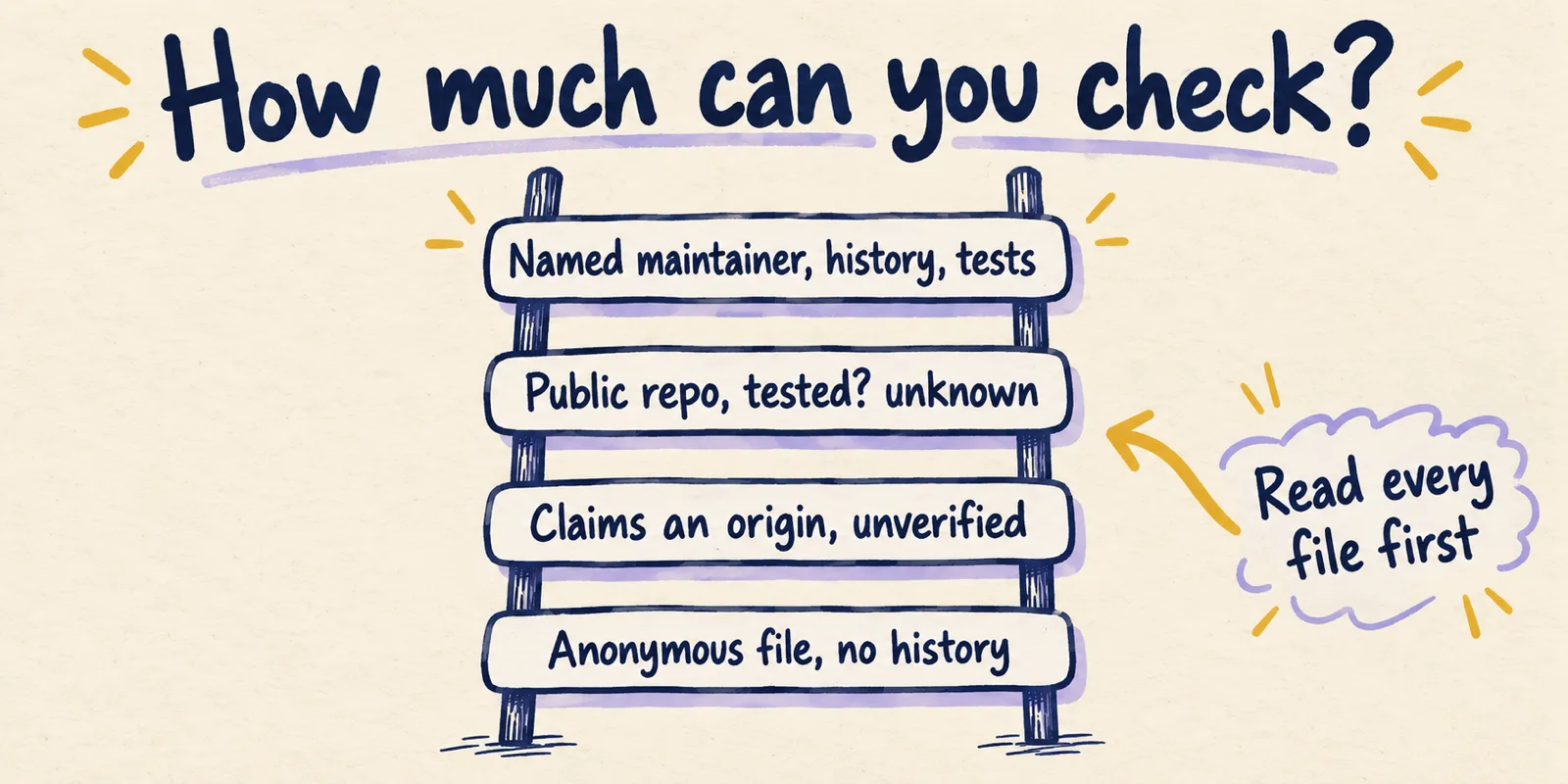
Security belongs in the provenance column too. Anthropic's documentation says to use skills only from trusted sources and to audit every bundled file, because a malicious skill can direct Claude to run tools in ways that do not match its stated purpose. Snyk's February 5, 2026 study scanned 3,984 skills from two public registries, ClawHub and skills.sh. It found critical-level issues in 13.4% (534), at least one security flaw in 36.82% (1,467), and 76 confirmed malicious payloads. That sample is not design-specific and does not include Anthropic's repository, so it says nothing about any particular design skill. It does show that a public skill file deserves the same review as a dependency. (Reported: Snyk.)
A five-point rubric for judging a design skill
The rubric below combines Anthropic's authoring guidance, Figma's guide and the observable features of the frontend-design file. The criteria are our synthesis (inference), but each one has a check you can perform by reading the file.
| Criterion | Question to ask | Good sign | Warning sign |
|---|---|---|---|
| Provenance | Who wrote it, where is the source, when did it last change? | Named maintainer, public repo, commit history you can read, a pinned commit | No author, no history, a claim of origin you cannot check |
| Specificity | Does it say what to do, at the right altitude? | Concrete defaults and a procedure, without hardcoding things the brief should decide | Adjectives only ("modern, clean, elegant") or a pile of fixed hex codes |
| Negative constraints | Does it name the outputs to avoid, and say when they are allowed? | A list of specific tells plus an escape clause such as "the brief wins" | Blanket bans that fight your own brand, or no bans at all |
| Token naming | Does it use your tokens and vocabulary? | Names and roles that match your system (semantic versus primitive, variants), and a rule to search the library first | Generic color and type names that you must translate every time |
| Test evidence | Is there evidence it changes output? | Evals or a before/after on stated briefs, a baseline without the skill | Only testimonials or install counts |
Two checks come straight from Anthropic's guidance. The description should state what the skill does and when to use it, and the body should stay under 500 lines. The authoring guide also says to build evaluations first:
Create evaluations BEFORE writing extensive documentation.
Figma's guide adds three points that matter for design systems: put your most important rules first, encode your token taxonomy and variant structure, and keep skills small and composable. It also suggests a "gotchas" section for failure patterns you have seen. A design skill that never mentions your tokens or components is generic by construction. That is fine for a one-off landing page and a poor fit for a product with an existing system. (Documented: Figma.)
Worked example: reading frontend-design against the rubric
This is a reading exercise, not a benchmark. We did not run the skill on any brief, and nothing below says it is better or worse than another file.
- **Provenance.** The file lives in Anthropic's repositories. we fetched it on October 1, 2026: 71 lines and 1,516 words, identical in
anthropics/skillsand in theanthropics/claude-codeplugin folder. The history shows rewrites on June 9, 2026 and September 3, 2026 (commit41bbe19, "Update frontend-design skill to avoid generic design defaults"). The November 2025 post described the original as about 400 tokens. So the file has grown and changed, which means a review written last spring may describe a different skill. Pin the commit you test. - **Specificity.** It asks for a two-pass process: write a compact plan (4 to 6 named hex values, type roles, a layout concept), then review the plan against the brief and revise any part that reads like a generic default before writing code. It sets a line-length default of under 80 characters. It leaves the actual palette and typefaces to the brief.
- **Negative constraints.** It lists five clusters it calls generic: cream with a serif and a terracotta accent, near-black with an acid-green accent, broadsheet layouts, identical rounded cards with the same soft shadow, and template chrome such as an all-caps eyebrow above every heading. It adds that the brief's own words always win, including when the brief asks for one of those looks.
- **Token naming.** None for your project, by design. It asks Claude to invent a token set per brief. If you have a design system, you would pair it with a skill like the one Figma describes rather than rely on this alone.
- **Test evidence.** Anthropic's post shows examples, not measurements. Any claim beyond that is yours to establish.
A pattern appears across the five rows. The file does well on negative constraints and process, and it states its own limits. Whether that translates into output you prefer is an empirical question, and the next section is how to answer it.
A reproducible A/B protocol
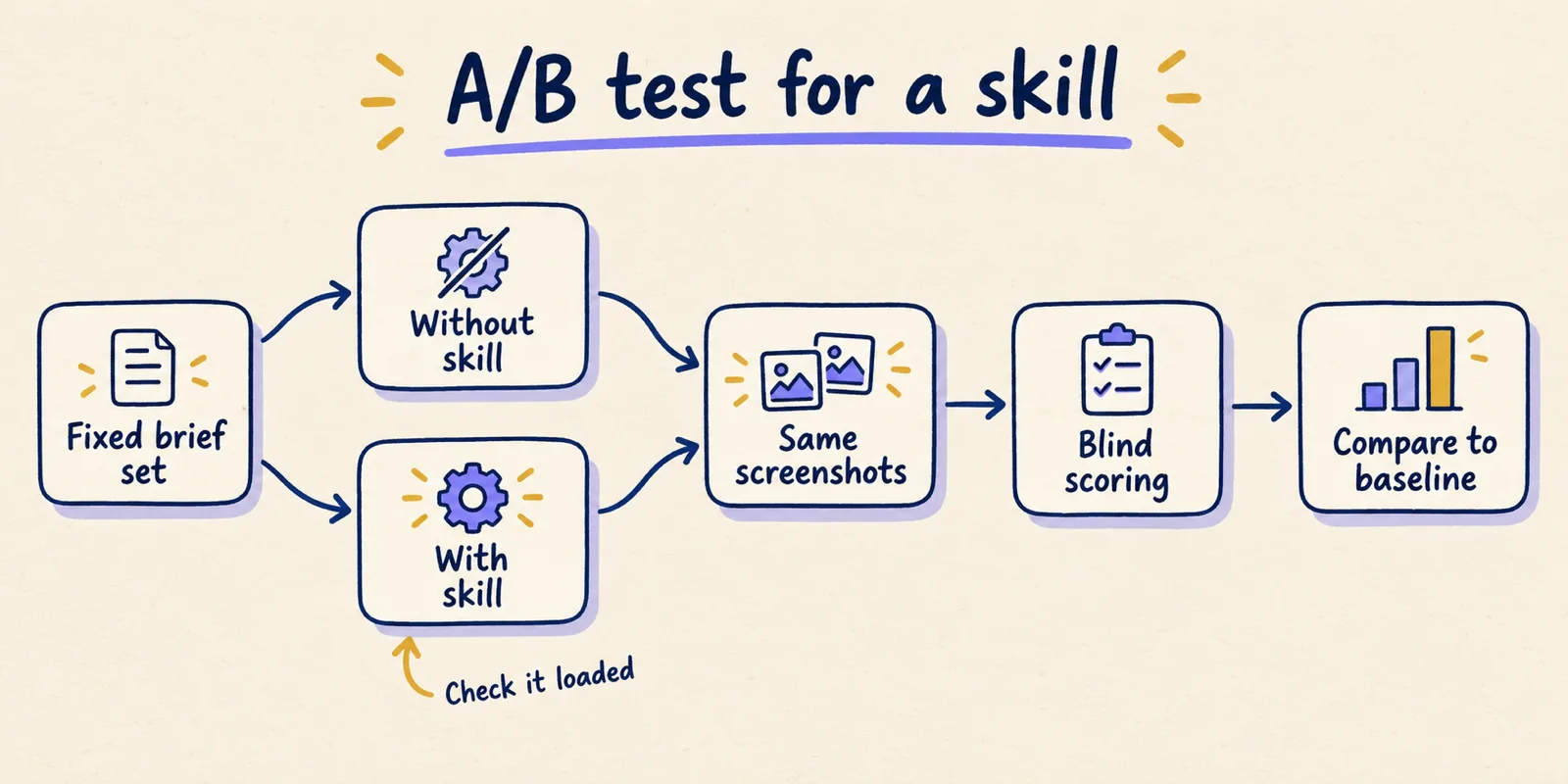
The aim is to compare the same model on the same briefs with and without one skill, and to avoid fooling yourself. The design below follows the baseline-first approach in Anthropic's authoring guide. The specific numbers (five briefs, three runs, two viewports) are our choices, not Anthropic's.
- **Fix the brief set.** Write 5 short briefs that cover different jobs: a pricing page, a dashboard, a settings form, an empty state, a marketing hero. Freeze the text and do not edit it between runs.
- **Pin the variables.** Record the model, the harness (for example Claude Code and its version), the date, and the exact skill commit. Use one clean project directory with no other design instructions.
- **Create the baseline.** Start a fresh session with the skill folder removed or renamed, and confirm in the session that the skill is not listed. Run each brief 3 times.
- **Create the treatment.** Add the skill, start a fresh session, and run the same briefs 3 times. In the transcript, confirm the skill actually loaded, because description matching decides that. If it did not, invoke it explicitly and note that in the log.
- **Capture identical screenshots.** Use the same two viewport sizes for every output, for example 1440 by 900 and 390 by 844, and save them with neutral file names.
- **Score blind.** Have someone who did not run the tests rate each screenshot from 1 to 5 on the criteria you care about (distinctiveness for the brief, hierarchy, legibility, brand fit), with condition labels removed.
- **Count the tells.** Separately, count how many of the five defaults named in the skill appear in each output. This is a rough, mechanical check you can do by reading the CSS and the screenshot.
- **Read the disagreements.** Look at the briefs where baseline and treatment differ most, and at runs that differ within one condition. Report the sample size and the briefs you chose, and do not generalize past them.
| Brief | Condition | Run | Skill loaded? | Commit / version | Screenshot | Blind score | Tells counted |
|---|---|---|---|---|---|---|---|
| B1 pricing page | baseline | 1 | no | n/a | b1-base-1.png | ||
| B1 pricing page | with skill | 1 | yes (checked in transcript) | 41bbe19 | b1-skill-1.png |
Three confounds deserve attention. A skill that never triggered tells you nothing, so check the transcript. Model updates change results between weeks, so record the date and model in every row. And a brand-new session that already contains your own long project instructions can swamp the skill, so keep the test project minimal. With three runs per cell you can see whether a difference is large and consistent; you cannot call it statistically significant, and you should not say so.
A short worked example of how to read the outcome. If the skill version wins on every brief but loses on the one that has strict brand colors, the useful finding is that the skill's "avoid defaults" push conflicts with a pinned palette. That points to the fix: add your palette as a brief constraint, or write a project-level skill that names your tokens.
Choose a skill the way you choose a dependency
A Claude design skill is a short, readable text file that Claude loads when a request matches its description. That makes it inspectable, versionable and testable, which is the opposite of how most "best skills" lists treat it. Read the file, check who maintains it and when it last changed, test it against your own briefs with a baseline, and re-test when it updates.
We could not find a controlled comparison of design skills, and Anthropic's own evidence for its frontend-design skill is a set of examples. Until that changes, the honest answer to "which is best" is that nobody has shown it, and the rubric and protocol above are the way to find out for your product. Pair a general-purpose skill like frontend-design with a small, project-specific skill that names your tokens and components, and treat both as code that gets reviewed.
Everything here reflects what the linked pages said on October 1, 2026. Skills, plans and product features change quickly, so check the primary sources before you build a workflow on them.