AI design tools
Figma Opened Its Canvas to Agents: What use_figma Does, What It Needs, and What It Changes for Design Systems
Agents can now write to Figma files, not just read from them. Here is what the tool does, what it requires, and how a design system should prepare.
· Diagram Studio Editorial
Direct answer
use_figma is a tool in Figma's remote MCP server that lets a coding agent write native content, such as frames, components, variables and auto layout, into a Figma Design file. Figma announced it on March 24, 2026. It requires a Full seat, works best with a skill, and was free in beta as of October 1, 2026, with usage-based pricing planned.
What Figma changed on March 24, 2026
Until this announcement, most Figma MCP tools read from a file: they pulled design context, variables and screenshots so a coding agent could write code. On March 24, 2026, Figma announced that agents can also write to Figma files, through a tool called use_figma. Figma opened it as an open beta the same day (documented).
In practice that means an agent such as Claude Code, Codex or Cursor can create frames, components, variables and auto layout in a Design file instead of describing them in text. Figma's launch post names these clients: Augment, Claude Code, Codex, Copilot CLI, Copilot in VS Code, Cursor, Factory, Firebender and Warp.
The announcement bundles a second idea, skills. A skill is a markdown file that tells an agent how your team works. Figma pairs the two on purpose: the tool gives agents access, the skill gives them conventions.
Now you can use AI agents to design directly on the Figma canvas, with our new use_figma MCP tool and skills to teach them. Open beta starts today.
— Figma (@figma) View on X
This article was written from Figma's documentation and from two independent hands-on write-ups. The editorial team has not used the tool, so everything below is labelled as documented (Figma's own pages), reported (a named third party) or inference (our reading).
How use_figma works under the hood
use_figma is a general-purpose creation and editing tool for Design, FigJam and Slides files, and it only exists on the remote MCP server (documented in Figma's tools reference). Figma's own skill file explains the mechanism: the agent writes JavaScript that runs in the context of Figma's Plugin API, and whatever it returns comes back as JSON (figma-use skill).
That is a different model from an image generator. The agent is not painting pixels; it is calling the same API a plugin would, against a live file. The skill file reads like a set of lessons learned from doing that:
- Colors use a 0 to 1 range, not 0 to 255.
- Pages load incrementally, so the agent must await a page switch instead of setting it synchronously.
- Related children belong in auto layout frames rather than absolute-positioned ones.
- Variables should have explicit scopes, because the default scope pollutes every property picker.
- Text edits must load the font before changing it.
- Every write should return the IDs of the nodes it touched so later calls can use them.
Figma's recommended working pattern is incremental: inspect the file for existing conventions, build a skeleton with stand-in nodes, fill it section by section, then check structure with get_metadata and appearance with get_screenshot. The docs also say large changes work best in small steps (documented).
Our reading (inference): this explains why the output tracks your file so closely. The code the agent writes can only reference components, variables and styles that exist and that it can find.
use_figma, generate_figma_design and the Figma agent are different tools
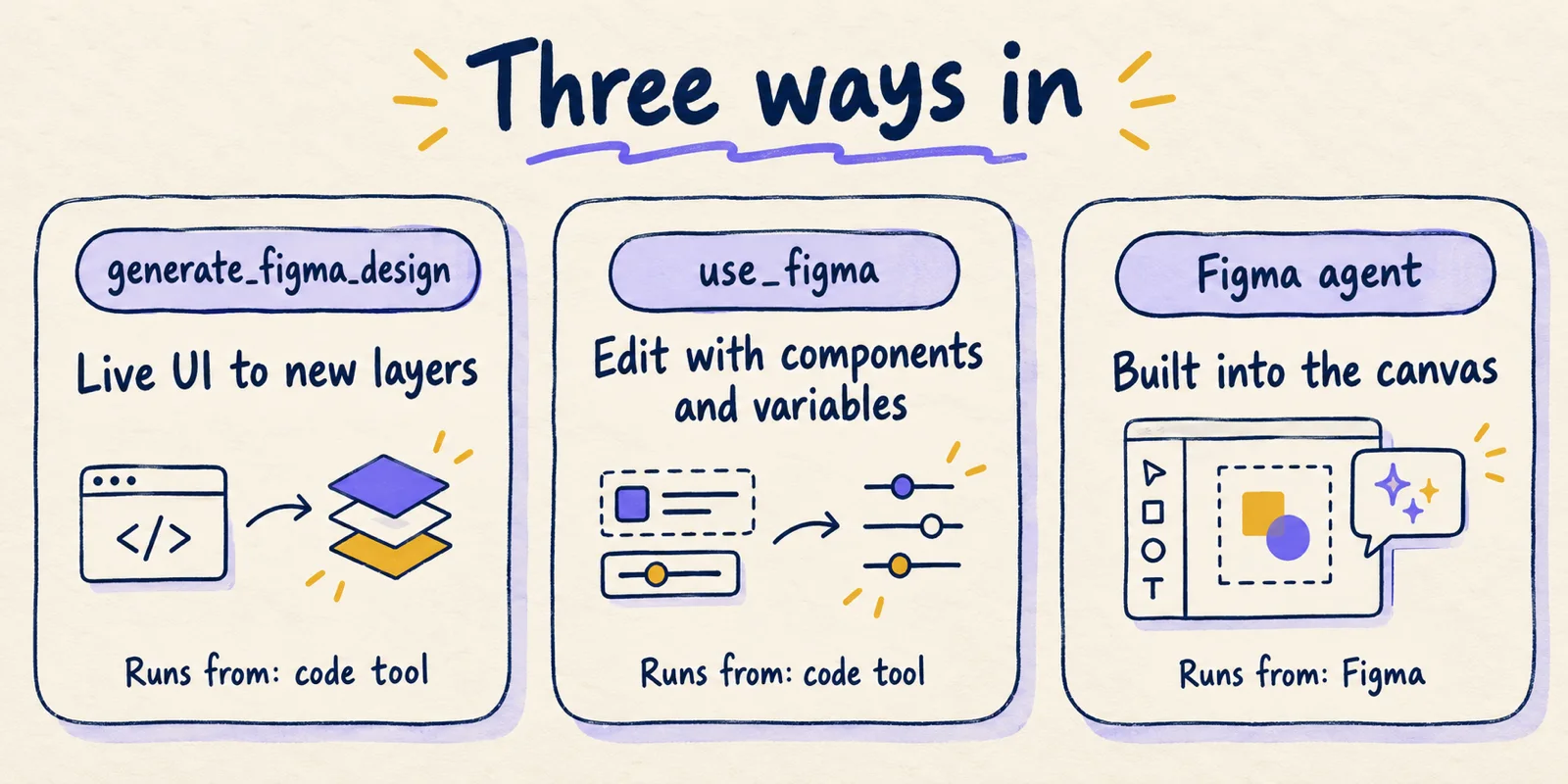
Three names get mixed up, and they start from different places. The table below compares what Figma documents for each as of October 1, 2026.
| generate_figma_design | use_figma | Figma agent | |
|---|---|---|---|
| Starts from | Live UI in a browser or app (HTML), or clipboard | A prompt plus an existing Figma file | A prompt inside Figma's own canvas |
| Runs in | Your MCP client | Your MCP client | Figma's built-in left rail |
| Output | New editable layers from the interface | Frames, components, variants, variables, styles, text | Edits to the open file |
| Rate limits | Documented as exempt from standard limits | Standard MCP limits apply (inference: it is not on the exempt list) | Not an MCP tool; credits apply at general availability |
| Status noted by Figma | Part of the MCP server | Open beta, free for now | Beta; moves to general availability October 6, 2026 |
Figma's launch post describes the relationship between the first two. When designs drift from code, generate_figma_design brings the latest UI into Figma, and use_figma then edits those designs using your components and variables. The agent built into Figma is a separate product. In its May 20, 2026 announcement Figma wrote that you should use its agent when working on the canvas, and use the MCP server and use_figma to pull code onto the canvas or push designs back to code (Figma blog).
Skills: markdown that carries your team's conventions
Figma defines skills as markdown instructions that shape how agents build on the canvas: the workflow steps, their order, conventions and specialised knowledge. Figma also says anyone can write one and that doing so does not require building a plugin (documented).
The foundation is /figma-use, which teaches an agent how to use the tool properly. Figma's skills help page lists the skills it ships, including figma-use-figjam, figma-use-slides, figma-code-connect and two examples, figma-generate-library and figma-generate-design. They install through Figma's plugin in supported tools or by downloading them from GitHub.
The launch post also showcased nine skills, several from named teams at Uber, One North, Edenspiekermann, Rad Collab, Firebender, Warp and Augment Code. The list shows what people considered worth encoding:
/figma-generate-library: create components from a codebase./figma-generate-design: create designs with existing components./create-voice: screen reader specs (Ian Guisard, Uber)./cc-figma-component: components from JSON (Nick Villapiano, One North)./apply-design-system: connect designs to system components (Chris Goebel, Edenspiekermann)./rad-spacing: hierarchical spacing (Nolan Perkins, Rad Collab)./edit-figma-design: orchestrated workflows with Warp and Oz./sync-figma-token: token sync with drift detection (Firebender)./multi-agent: parallel workflows (Augment Code).
Skills teach Claude Code how to work directly in the design canvas, so you can build in a way that stays true to your team’s intent and judgment.
A fair reading (inference): a skill is closer to a team style guide for the agent than to a program. It does not add capabilities; it narrows choices. Figma's Workflow lab page says neither /figma-generate-design nor /figma-use produces finished designs, only rough starting points that need refinement.
The tool and the skill depend on each other. Figma's documentation says to install the /figma-use foundation skill first, so treat the pair as one feature.
What it needs and what it costs as of October 1, 2026
These items can change, and Figma says so itself. Check the linked pages before you plan around any figure.
| Topic | What Figma documents |
|---|---|
| Seat to write | A Full seat. Dev seats are read-only (design context, variables, screenshots). Edit permission on the target file is also required. |
| Server | Remote MCP server only. The desktop server does not do write to canvas. |
| Rate limits, Dev/Full seats | Starter: 200 calls per day, 10 per minute. Professional: 200 per day, 15 per minute. Organization and Enterprise: 600 per day, 20 per minute. |
| Rate limits, View/Collab seats | 20 calls per month on Starter, 6 per month on paid plans. |
| Exempt from limits | add_code_connect_map, create_new_file, whoami (the tools page also marks generate_figma_design as exempt). |
| Output size | 20kb response limit per call. |
| Price | Free during beta; "eventually" a usage-based paid feature. No price announced in the pages we read. |
The sources are Figma's rate limits page, the write to canvas guide and the MCP server FAQ. The rate limits page adds that Figma reserves the right to change them.
One date is easy to misread. Figma's AI credit FAQ says the agent in Figma Design and the Weave tools move from open beta to general availability on October 6, 2026, and will then draw on the same AI credit pool as Figma Make. That page does not name use_figma. Whether the MCP write tool follows the same date or the same pool is not stated there, so it is an open question rather than a fact.
Also note a small inconsistency: the rate limits page lists three exempt tools, while the tools page calls generate_figma_design exempt too. Neither page says how many calls a typical use_figma task consumes.
What it means for design systems
For a design-system team the notable change is not that an agent can draw. It is that your system's structure now acts as the prompt. The sections below separate what two named practitioners reported from what we infer.
Reported by azukiazusa (March 28, 2026): using the figma-generate-library skill, the agent extracted tokens from a codebase, created Figma variables and built a component library including 18 Button variants. With figma-generate-design it then assembled a settings screen from those components. Problems appeared too: an alert component frame was too small and clipped content, and the agent first used spacer frames instead of auto layout until the author corrected it. The author concluded that leaving everything to the agent can produce unintended design choices in subtle areas.
Reported by Katharina Pilz (March 31, 2026): importing code components produced 24 button variants with variables from color tokens, and the pricing section she requested used auto layout throughout. She also saw generic stand-in icons, uneven card heights across tiers, invented copy, and token usage that burned faster than normal chat. Her summary of the result:
You get something eighty percent there in seconds. The remaining twenty percent is where you step in as a designer.
Both are single-author, small-scale accounts, not benchmarks. They show what is possible and where it slipped, nothing about reliability across a large system.
From those accounts and the skill file's rules we draw this checklist (inference, not a Figma requirement):
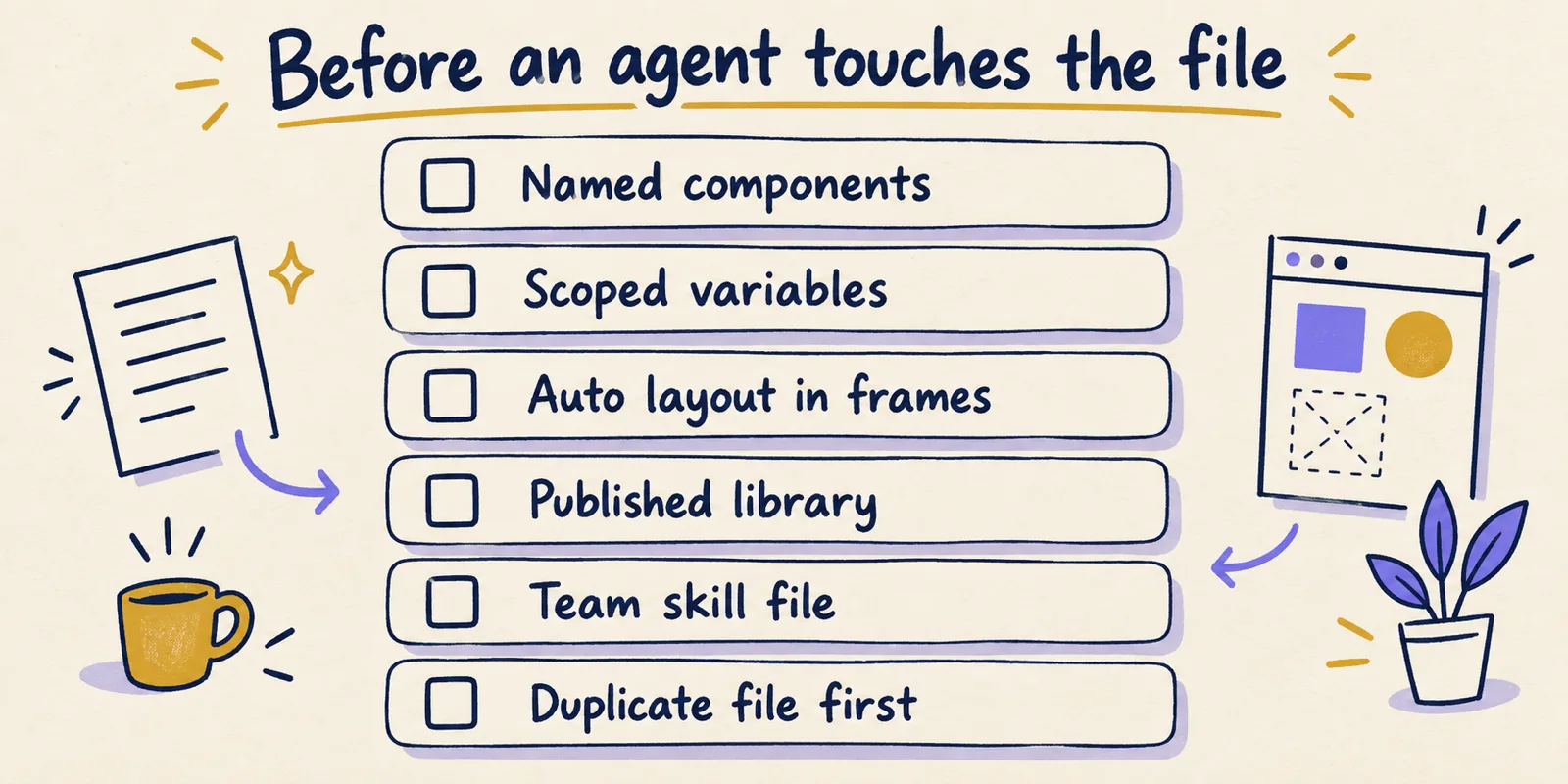
- Components have descriptive names, so the agent can find the right one instead of guessing.
- Variables exist for color, spacing and type, with scopes set, because the skill itself warns about unscoped variables.
- Existing frames use auto layout, so the agent has a pattern to copy.
- Components are published to a library; Figma notes they must be published manually before Code Connect completes.
- A team skill states the rules a reviewer would otherwise repeat, such as spacing steps and which component to use for a button.
- Experiments run on a duplicate file; Figma's FAQ recommends testing on duplicates before changing production libraries.
Limits and open questions
Documented gaps first. Figma lists no image support (assets, imported components with images or videos, and GIFs), no custom fonts, and the 20kb response limit per call. Its launch post says it will add more, working toward parity with the Plugin API "starting with image support and custom fonts" (documented). The tools page, however, describes use_figma as working with images and lists an upload_assets tool for PNG, JPG, GIF and WebP files up to 10MB. The pages do not reconcile this, so check the current docs and test before relying on either statement.
Open questions the pages we read do not answer:
- What the paid price will be, and whether
use_figmawill use AI credits or a separate meter. - How many tool calls a realistic task such as a full component set consumes against the daily limits.
- How reliably output matches a large, messy production library; only small hands-on accounts exist.
- How teams should review agent edits at scale. The docs describe validating with screenshots; they do not describe a diff or approval workflow for design changes (inference: none is documented).
There is also an honest limit on this article: we did not run the tool. Treat the reported results as two data points.
Who should pilot it now, and a safe way to start
Good fit now: teams that already have a tokenised, named, published design system, already use a supported coding agent, and have Full seats for the people who will review. Poor fit now: teams without a system (the agent has nothing to follow), teams that need images or custom fonts in the output, and anyone who needs a known price before building a process around it.
A low-risk pilot, as a short protocol:
- Duplicate a non-critical file and confirm the person running the agent has a Full seat and edit access.
- Install
/figma-usefirst, then one example skill, using Figma's plugin or the GitHub download. - Give the agent the file URL and name the library, components and variable modes to use.
- Ask for one small, checkable task, such as a single component set or one screen built from existing components.
- Review for the failures reported so far: clipped content, spacers instead of auto layout, stand-in icons, invented copy.
- Record how many tool calls the task used so you can compare against your plan's daily limit and judge a future price.
- Turn each repeated correction into a line in your team skill, then rerun.
If the file is a production library, stop at step 1 until you are sure edits are reversible with version history.
Conclusion: treat the file as the prompt, and the beta as a beta
use_figma gives coding agents real write access to Figma Design files through the Plugin API, and skills let a team encode how it wants that access used. As of October 1, 2026 it needs a Full seat, is free but unpriced, and has documented gaps in images, fonts and response size. Early independent reports show useful, editable output that still needs a designer's review.
The lasting consequence is for design systems: the names, variables and layout rules you already maintain now steer an agent. Prepare those, pilot on a duplicate, and re-check Figma's pages for pricing and limits before you commit.