Creative tools & workflows
Figma Pricing and Seat Calculator for Teams
Estimate what Figma will cost at signup, after a midyear hire, and at renewal. Use the seat calculator and three worked team budgets.
· · Diagram Studio Editorial
The same seven people can cost $936 or $1,344 a year on Figma Professional. The first budget gives designers, developers and workshop facilitators different seats. The second gives every person a Full seat.
The useful budgeting exercise is to match seats to work, then account for the month each new seat starts. This guide uses US list prices checked November 12, 2026.
Direct answer
Figma Professional starts at $192 per year for one Full seat on annual billing, or $20 per month on monthly billing. Dev and Collab seats on annual Professional cost $144 and $36 per year. View seats are free. A team with three Full, two Dev and two Collab seats pays $936 at signup. Add a Full seat for the final six months at the monthly rate and the estimated first year rises to $1,056.
Choose seats by the work people do
Figma sells a plan for the team or organization and assigns seats to individuals. The plan controls which features are available across the workspace. The seat controls what a person can do within those features. Choose one seat for each person based on the most demanding task they need to perform. Figma billing guide
| Seat | Assign it when someone needs to |
|---|---|
| Full | Edit Figma Design files or use the Full-seat product set |
| Dev | Use advanced Dev Mode for design handoff |
| Collab | Edit FigJam boards or Figma Slides decks |
| View | Open shared files, comment or use basic design inspection |
A designer can use Dev Mode with a Full seat. A developer who needs measurements, property values or basic inspection can start with View. If their handoff requires advanced Dev Mode, budget for Dev. Check file sharing permissions separately so each person can open the files they need. Compare Figma seats · Figma pricing FAQs
Reviewers can view and comment on shared files on paid plans without an extra paid seat. For a ten-person group with four reviewers, start the budget with six paid seats. If your team also relies on Figma MCP, check how seat choice affects tool access and quotas. Figma MCP seat guide
Compare Figma prices on the same billing term
The prices below are in US dollars per seat per month when billed annually. Multiply by 12 to get the annual commitment. Starter is free with limited access. Professional offers monthly and annual billing. The published Organization and Enterprise rates are annual. Figma plans and pricing
| Annual plan | Full | Dev | Collab | View |
|---|---|---|---|---|
| Professional | $16 | $12 | $3 | $0 |
| Organization | $55 | $25 | $5 | $0 |
| Enterprise | $90 | $35 | $5 | $0 |
A Professional Full seat works out to $16 a month on annual billing, with $192 due for the year. On monthly billing it costs $20 a month. Over 12 months at the same rate, that totals $240. If you need the seat for six full months, six monthly payments total $120. Use the quoted monthly rate when budgeting a monthly Dev or Collab seat. Figma staff explanation of Full seat billing
Annual pricing also changes the shape of your cash flow. A team that expects to keep its base seat count for the year can set aside the upfront amount. When hiring dates are uncertain, price the committed seats first and model the additions separately.
Calculate your Figma seat costs
Open the Figma seat cost calculator
Choose an annual plan and enter the number of Full, Dev and Collab seats you expect to buy at signup. Use Add seats midyear to model one group of additional seats. For Professional, enter the monthly rate you expect to pay for those seats. For Organization or Enterprise, the calculator estimates additions using the published annual rate and the whole months left in the term. Confirm timing and charges for Enterprise with your contract.
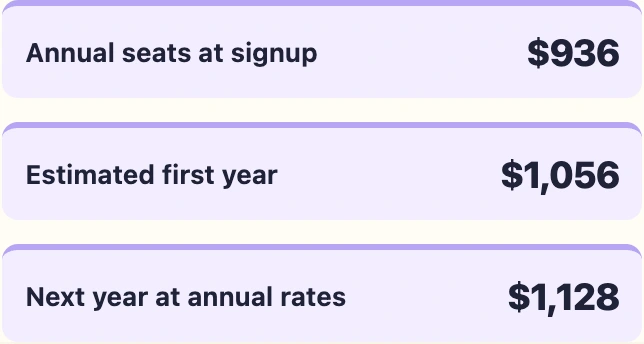
The first-year total adds the estimated charges for seats purchased midyear to the signup bill. The next-year total assumes you keep all seats and move any separately billed seats onto annual billing. Actual invoices may use day-based proration. The estimates exclude taxes, discounts, AI credit purchases and negotiated terms.
Three worked Figma budgets
| Team | Seats at signup | Midyear addition | Signup | First year | Next annual term |
|---|---|---|---|---|---|
| Freelancer | Professional, 1 Full | None | $192 | $192 | $192 |
| Product team | Professional, 3 Full, 2 Dev, 2 Collab | 1 Full, 6 months at $20 | $936 | $1,056 | $1,128 |
| Multiple teams | Organization, 12 Full, 8 Dev, 10 Collab | 2 Dev, 6 months at $25 equivalent | $10,920 | $11,220 | $11,520 |
Freelancer on Professional
One Full seat at $16 × 12 costs $192 for the year. A client who needs only to comment can use a free View seat. If the client needs to edit the file, check the sharing setup and price the appropriate editing access before quoting the project.
Seven paid seats on Professional
Three Full, two Dev and two Collab seats cost $78 per month equivalent (3 × $16 + 2 × $12 + 2 × $3). The annual bill at signup is $936. A fourth Full seat billed for six months at $20 adds $120, bringing the first year to $1,056. Move that seat to annual billing at renewal and the next annual budget is $1,128. Keep it on a separate monthly subscription for another full year and the projected total is $1,176 at unchanged rates.
Thirty paid seats on Organization
Twelve Full, eight Dev and ten Collab seats total $910 per month equivalent (12 × $55 + 8 × $25 + 10 × $5), or $10,920 for the annual term. Two additional Dev seats with six months remaining add about $300 at $25 per seat per month equivalent. That puts the first year at $11,220. Carry all 32 seats into the following year and budget $11,520.
Check new seats, unused seats and AI credits
On an annual Professional subscription, a new paid seat can start on a separate monthly subscription. The first charge covers the remaining days of that monthly period at the prorated rate. Subsequent full months use the full monthly price until the seat moves to the annual subscription or is removed. On Organization, approved seats are generally prorated from approval to the end of the annual term, with quarterly invoice checkpoints. Figma pricing FAQs · Professional billing guide
Before you approve a request, check purchased seats by type. If a designer has left and their Full seat is available, assigning it to a new designer may avoid a new purchase. Moving someone to View frees their paid seat for reassignment. Review purchased quantities separately before renewal if you want the bill to reflect fewer seats. Figma seat management
Figma lists monthly AI allowances of 3,000 credits for a Professional Full seat, 3,500 for Organization Full and 4,250 for Enterprise Full. Dev, Collab and View seats have 500 credits per month. Starter users and View seats also have a 150-credit daily cap. Teams can buy additional shared credits separately. Estimate those costs outside your seat budget. Figma AI credit allowances
Frequently asked questions
Can a free viewer inspect designs?
Yes. Viewers can open shared files, view measurements and property values, and use basic inspection. Advanced Dev Mode requires an eligible paid seat. Choose based on the handoff features the developer uses. Figma pricing FAQs
How much does a Professional Full seat cost for one year?
One Full seat costs $192 for an annual term at the $16 monthly-equivalent rate. Twelve payments at the $20 monthly rate total $240 at unchanged prices. Check which billing option is selected before comparing the amounts. Figma pricing · Figma staff billing explanation
Does a midyear monthly seat move to annual at renewal?
The seat can continue to bill monthly. Review those seats before renewal and decide which ones to move onto the annual subscription. For the next budget, model the remaining separate monthly charges if you plan to keep that setup. Figma pricing FAQs
Does a seat reassignment change the bill immediately?
Reassignment changes who can use the seat. A purchased seat can remain on the subscription even when nobody is assigned to it. Check the renewal quantities to reduce the number of paid seats you carry forward. Figma seat management
Budget the seats you need at renewal
Run the calculator with today’s seat counts and the hires you expect this year. Before renewal, pull the purchased-seat list and match it to the people who still need each type. That gives the billing owner a concrete list of seats to reuse, remove or bring onto annual billing. If the team still needs a different design workflow, compare the options before committing to another term. Figma alternatives