Creative tools & workflows
Loom Alternatives: Compare Hosted Workspaces and Capture-Only Recorders
Hosted workspaces vs capture-only recorders: Cap, Tella, Screen Studio, OBS, and Vidyard compared across the record–share–review loop with current limits, costs, and migration options.
· · Diagram Studio Editorial
Your team records a walkthrough, sends a link, and waits for comments to come back. Moving off Loom means replacing that whole loop, not just the recorder. All five tools compared here capture screen video, yet they differ in what happens after the recording stops: whether the video is hosted, reachable through a share link, open to the recipient for viewing and reply, kept over time, and downloadable as a file. That difference settles most buying decisions before feature lists matter.
This comparison is built from the vendors' official pricing and product pages, current on 4 November 2026. No product was installed, purchased, or benchmarked for this article, so recording quality, export speed, and reliability are not judged here. Prices are in USD as displayed on that date and should be rechecked before purchase.
Direct answer
To replace Loom, choose by workflow class first. Vidyard's paid tiers, Tella, and Cap Pro host recorded videos behind shareable links; documented features differ by plan, and several need a hands-on check. Screen Studio adds hosted share links with timestamped comments on macOS, capped at 30 minutes per shared recording. OBS records locally and leaves hosting to your team. Free tiers bind tightly: Vidyard allows five ordinary recordings a month; Cap allows 25 five-minute links. Compare volume caps and per-seat annual cost before trialing.
The Loop You Are Replacing
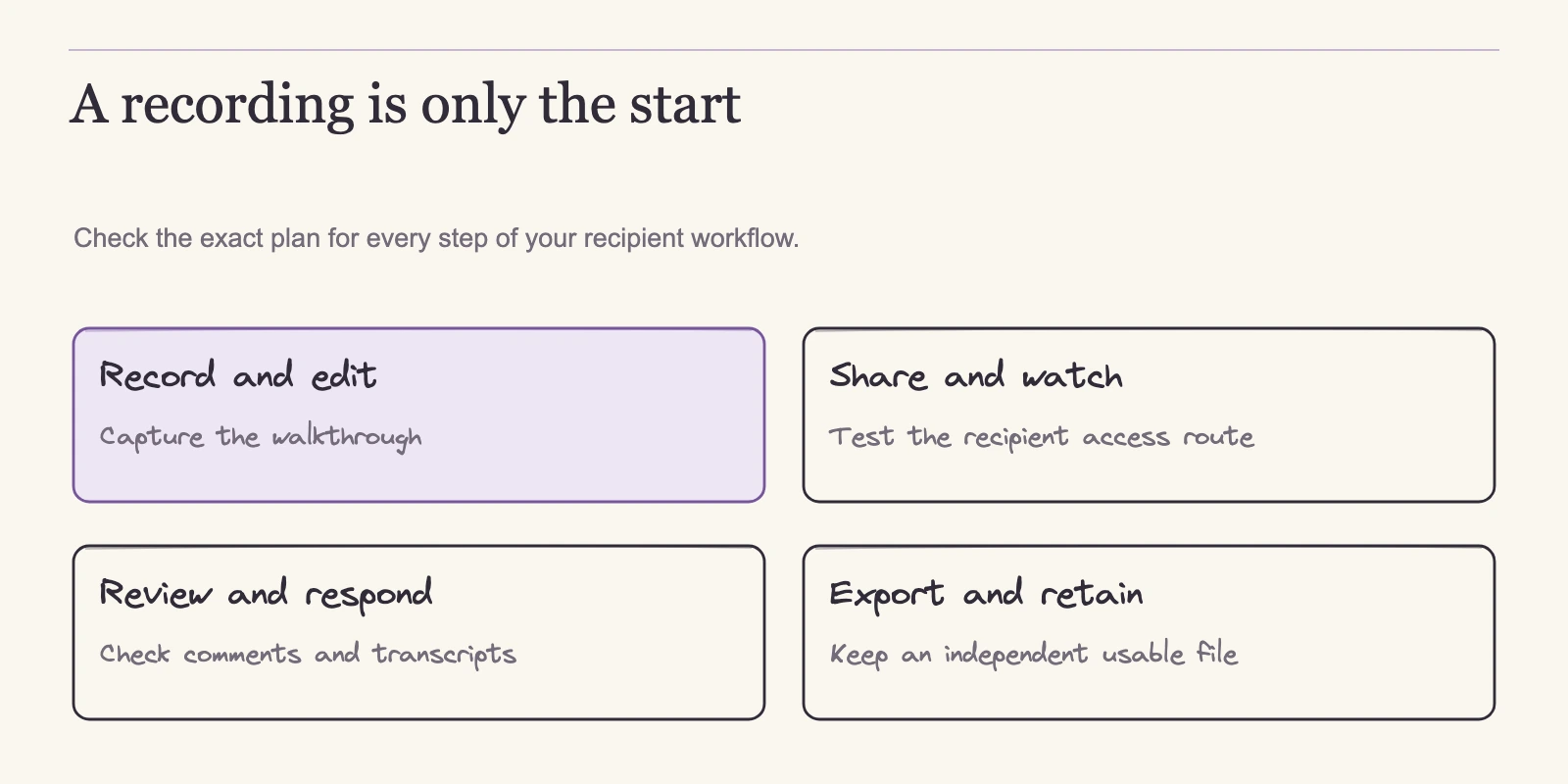
A Loom-style workflow strings five jobs together: record the screen, usually with a webcam; trim or polish the video; turn it into a shareable link; let the recipient watch and respond; and export a finished file the team can store or reuse. Every candidate here does the first job. Recording is the one thing all five tools have in common; the rest of the chain is where they diverge.
The five tools sit at different points along that chain. Cap is a recorder with an optional hosted layer, sold as a free personal license, a paid Desktop license, or a Pro subscription. Tella is a hosted video workspace with native macOS and Windows recorders plus a Chrome extension. Screen Studio is a macOS-only recorder aimed at demonstration videos, now sold by subscription. OBS is free, open-source capture and streaming software. Vidyard is a hosted business video platform with desktop apps and a free tier.
Two Workflow Classes
A hosted async-video workspace stores the recording and supplies the layer around it: a shareable link, access controls, viewing and responding, retention, and download. A capture-only recorder returns a file, and the team owns everything after that. This boundary describes who does the work, not video quality.
| Tool / plan | Hosted loop coverage | Where it stops or binds |
|---|---|---|
| Vidyard Starter | Hosted videos, branded sharing, password protection, folders, analytics, viewer notifications, editing tools listed | Free tier is separate: 5 ordinary recordings/month, each up to 30 minutes |
| Tella Pro / Premium | Hosted videos, comments, reactions, transcription in 106 languages, exports. Pro: 4K export, 60 fps up to 5 minutes. Premium: 4K sharing, custom domain, domain restriction, no Tella branding | SSO/SCIM are paid add-ons outside Enterprise; exact monthly prices were not captured |
| Cap Pro | Unlimited cloud storage and bandwidth; transcripts; analytics; custom domain and password shares; custom S3 | Loom importer gated to Pro; per-link duration cap not listed |
| Cap Free | 25 cloud share links per month, each up to 5 minutes | Personal-use license; no commercial use; unlimited local editing not included |
| Cap Desktop | Same 25 cloud share links per month, 5 minutes each | Adds commercial use and unlimited local recording/editing; one user per license |
| Screen Studio | Hosted share links, browser streaming, username-based timestamped comments; links managed in a dashboard | macOS only; 30-minute cap per shared recording; longer projects export a file |
| OBS | None listed | Local capture and streaming; team owns hosting, sharing, and review |
Sources: Cap pricing, Tella pricing, Screen Studio, Vidyard pricing, OBS.
In the hosted band, the conversation lives next to the video. In the capture-only band, the team owns everything after the file: uploading it somewhere, managing access, collecting replies in a separate channel, and keeping versions straight. That arrangement can work when the team already runs a hosting and review path and ships finished files. Without that path, the extra workload appears after the first recording, not during setup.
The partial band needs the most care, because a plan limit or platform restriction can interrupt a workflow that looks hosted until it is not. Cap's free tier is licensed for personal use, so a team doing commercial work cannot rely on it; the Desktop license fixes that but keeps the 25-link ceiling. Screen Studio's hosted loop is real but bounded by macOS and the 30-minute shared-recording cap. Recording locally does not by itself guarantee privacy or compliance; those properties depend on where files go and what each provider does with them.
Once the class is clear, the next practical question is whether the tool runs on the machines the team actually owns.
First Filter: Platforms and What the Sender Gets
A tool that checks every workflow box still fails if it cannot install on the machines the team uses. Platform support is the cheapest filter here, and it disqualifies candidates before any feature row matters.
| Tool | macOS | Windows | Linux | Notes |
|---|---|---|---|---|
| Cap | Yes, macOS 13.1+ recommended | Yes, beta | Yes with glibc 2.39+ | Chrome extension available. Ubuntu 22.04 is not supported even via AppImage. |
| Tella | Yes, native recorder | Yes, native recorder | Not listed | Chrome extension available. Exact minimum OS versions and platform parity are not published. |
| Screen Studio | Yes, macOS Ventura 13.1+ recommended | No | No | FAQ states no near-future Windows plans. |
| Vidyard | Yes, desktop app | Yes, desktop app | Not listed | Desktop records screen and webcam together. Minimum OS and mobile recording parity are unverified. |
| OBS | Yes, macOS 13+ | Yes, Windows 10/11 | Yes | Version 33.0.1, dated 29 October. Multiple capture sources, scenes, audio mixing, hardware-dependent encoders. Linux package details not itemized. |
Sources: Cap download, Tella pricing, Screen Studio, Vidyard desktop app, OBS.
The platform table changes the candidate list quickly. Screen Studio fits a macOS-only team producing demo videos, but a mixed team with one Windows laptop cannot use it for shared recording duties. Among the hosted and partial-hosted tools, Cap is the only one with a documented Linux path, and that path is narrow: glibc 2.39 or newer, which Cap names as Ubuntu 24.04 or newer. A team still on Ubuntu 22.04 falls outside that set; Cap's download page says 22.04 is not supported even with an AppImage. OBS lists Windows 10/11, macOS 13+, and Linux with no equivalent requirement shown.
Tella and Vidyard cover macOS and Windows, but their minimum versions are not itemized, so older machines need a trial check.
A recording tool is usually a team purchase. If one member cannot run it, the team keeps a second tool for that person, and the consolidation the move was meant to achieve quietly disappears.
The sender also gets different capture shapes. OBS offers source-level control through multiple capture sources, scenes, audio mixing, and hardware-dependent encoders; verify the exact capture sources your workflow needs in a trial. Vidyard's desktop app records screen and webcam at once, the common walkthrough style. Tella and Cap offer native recorders alongside browser extensions. The pages do not itemize capture options beyond this, so verify application-window capture, camera overlay, or mic mixing in a trial rather than assume them.
Once the tool runs and captures what you need, the next question is what you can do with the result.
Editing and Export: Getting the Video Out
The official pages document export capabilities unevenly. Some state exact formats; others name resolutions but not containers.
| Tool | What the official pages list | Not itemized |
|---|---|---|
| Cap | 4K and 60 fps export; broad format flexibility | Exact codec and container list; Loom importer fidelity |
| Tella | Video, audio, raw clip, and subtitle exports; 4K export on Pro; 4K sharing on Premium; 60 fps on Pro up to 5 minutes, with Premium/Enterprise columns including 60 fps | Exact codec and container formats |
| Screen Studio | GIF or MP4 export with frame rate, size, and quality settings; up to 4K at 60 fps; cursor path captured for later smoothing, resizing, reshaping | Codec details beyond the export guide |
| OBS | Format guide covers MKV, hybrid MP4/MOV, and fragmented MP4/MOV; table lists hybrid MP4 default on Windows/Linux and hybrid MOV on macOS | Encoder behavior depends on hardware and configuration |
| Vidyard | Pricing page lists video editing tools; desktop app records screen and webcam | Download/export formats across plans |
Sources: Cap pricing, Tella pricing, Screen Studio export guide, OBS format guide, Vidyard pricing.
Cap's pricing page claims 4K and 60 fps export plus flexibility in output format. The page does not detail the exact codec and container list, so confirm the output your team needs before paying. Tella's pricing page lists video, audio, raw clip, and subtitle exports. Pro includes 4K export and 60 fps for clips up to five minutes; the Premium and Enterprise columns include 60 fps without that qualifier, and Premium adds 4K sharing. The page does not detail container formats.
Screen Studio's export guide documents GIF and MP4 output with controls for frame rate, output size, and quality, at up to 4K and 60 fps. It also captures the cursor path separately so you can adjust smoothness, size, or shape after recording. That is enough to plan a delivery format; it is not a promise that every codec the app supports is listed.
OBS publishes a dedicated format guide, and the guide carries an internal tension. Its compatibility table lists hybrid MP4 as the Windows and Linux default and hybrid MOV as the macOS default, while the accompanying text describes an MKV default, so do not assume a single universal default. The useful distinction is why the formats exist. Fragmented MP4/MOV writes data in pieces, making the file more resilient to interruption, and the hybrid form combines that resilience with the wider compatibility of a normal file.
For long demos where a crash is plausible, that resilience matters more than choosing the most common container. Teams that record long training sessions should verify the chosen container plays everywhere the audience will watch, not just on the recording machine.
Vidyard's pricing page lists video editing tools, so the platform does have a documented editor; the page does not promise editing parity with a desktop editor. Cross-plan download formats are not itemized, so confirm the output before relying on it.
The export question also separates the two classes. A hosted tool that cannot deliver a clean local file creates lock-in: the team can share the link but cannot archive or repurpose the recording. A capture-only tool that produces local files leaves sharing unsolved. Test the export path for the exact formats the team needs before moving real workload. A team that archives support recordings or reuses clips in customer documentation should verify it can pull a clean local file; if a tool only produces a link, the archive stays dependent on the provider.
A finished file is necessary but not sufficient; the recipient's path decides whether the asynchronous conversation actually happens.
The Recipient Side: Links, Access, Comments, and Transcripts
A video file is the easy half of a walkthrough. The real deliverable is a link someone can open, watch, and react to without a side conversation in chat. That is why hosted tools differ from capture-only recorders less on recording quality and more on what happens after the sender stops the timer.
Screen Studio's shareable links guide describes a hosted loop: a shared recording streams in the viewer's browser, a link can be created immediately after recording or after editing, and links are managed in an account dashboard. Its comments guide describes a viewer entering a name and adding a comment tied to the current video timestamp. The shared-recording cap is 30 minutes, so longer projects need a file export. The company's FAQ says recording and transcription process locally; that statement describes processing, not uploads, so do not read a never-uploads privacy guarantee into it.
The homepage also advertises cloud transcripts, which the FAQ does not reconcile with local transcription, so confirm transcript handling if searchable transcripts matter to your review process.
Tella's pricing page lists comments, reactions, and transcription in 106 languages across the paid plans. Premium adds a custom domain, domain restriction, and removal of Tella branding, which matters when hosted videos should feel internal or customer-facing. Cap's Pro plan lists transcripts, analytics, and custom domain and password shares alongside unlimited cloud storage. Vidyard's Starter plan lists branded sharing, password protection, and folders on its pricing page, and its desktop app page documents viewer notifications.
| Tool | Shown on official pages | Check in your trial |
|---|---|---|
| Vidyard Starter | Branded sharing, password protection, folders, viewer notifications, editing tools | Sign-in requirement, comment threading, transcript availability, download formats |
| Tella Premium | Custom domain, domain restriction, unbranded viewing, comments, reactions, transcription | Viewer access flow, private embed behavior, transcription accuracy |
| Cap Pro | Custom domain, password shares, transcripts, analytics | Viewer sign-in, comment threading, notification delivery |
| Screen Studio | Browser streaming, timestamped comments, dashboard link management | Access controls, retention, analytics; 30-minute shared-recording cap versus your clip lengths |
| OBS | None | Sharing and review are self-managed |
Sources: Vidyard pricing, Tella pricing, Cap pricing, Screen Studio shareable links, Screen Studio comments.
For external audiences, the sign-in question decides whether clients get a friction-free view or a registration wall; for internal teams, comment threading decides whether feedback lives next to the video. A designer sharing a prototype walkthrough with a client cares whether the link opens without a registration wall; a support lead cares whether comments land next to the video.
Even a smooth recipient experience is useless if the plan caps how often a team can use it, so volume limits come next.
Limits That Decide Whether the Workflow Survives a Week
If the recipient path fits, the next question is capacity. A plan that looks right for one recording a week can fail a few days into a rollout, and each vendor counts volume in a different unit: links for Cap, recordings for Vidyard, clips and credits for Tella.
Vidyard's free plan allows five ordinary recordings per month, each up to 30 minutes. The 15 AI videos on the same pricing page are a separate allowance, not 15 extra screen recordings. A team producing three walkthroughs a week averages 13 recordings a month (3 × 52 ÷ 12), about 2.6 times the free allowance.
Cap's Free and Desktop tiers include 25 cloud share links per month, each capped at five minutes. A sender posting two links per workday creates about 44 links a month (2 × 22, assuming 22 working days), 19 over the ceiling. Five minutes covers a short bug report, but if recordings regularly run past five minutes, the duration cap binds before the link count. Pro's page does not state a per-link duration cap; check the plan's actual behavior in a trial.
Tella's page lists unlimited videos with a six-hour limit per clip, and multiple clips can combine into longer videos. AI credits work separately: Pro includes 4,500 credits per user per month, Premium 9,000, pooled across the workspace, reset monthly, with no rollover. Ten seats on Pro pool 45,000 credits (10 × 4,500); the same seats on Premium pool 90,000 (10 × 9,000). Auto Capture is a beta feature that consumes credits, and a trial cannot start an Auto Capture take. The pages do not document per-minute Auto Capture consumption, so monitor the pool as a budget.
Storage limits are unevenly listed. Cap Pro lists unlimited cloud storage and bandwidth; Tella lists unlimited videos. Vidyard's pricing page does not list a storage cap for the free plan's five monthly recordings. For a team treating video as a long-lived record, check what happens to old files after the monthly allowance resets.
Volume caps tell you whether a plan can carry the workload; price tells you whether the team can afford the plan that does.
What a Team Actually Pays
The table below normalizes every option to a per-seat annual equivalent, with one-time purchases listed separately. This removes the confusion of comparing a monthly subscription with a yearly bill or a perpetual license. All prices are USD as shown on official pages on 4 November 2026. Taxes, promotions, and checkout terms are not included.
| Tool | Plan | Listed pricing | Per-seat annual equivalent (or one-time) |
|---|---|---|---|
| Cap | Desktop | $29/year or $58 once, one user per license | $29/year, or $58 one-time |
| Cap | Pro | $12/user/month, or $8.16/user/month billed annually | $8.16 × 12 = $97.92/user |
| Tella | Pro | $13/user/month billed annually | $13 × 12 = $156/user |
| Tella | Premium | $19/user/month billed annually | $19 × 12 = $228/user |
| Screen Studio | Yearly | Displayed at $9/month, billed yearly | $9 × 12 = $108, assuming the displayed rate equals the invoiced annual total |
| Screen Studio | Monthly | $29/month | $29 × 12 = $348 |
| Vidyard | Starter | $59/seat/month billed annually, or $89/seat/month monthly | $59 × 12 = $708/seat, or $89 × 12 = $1,068/seat |
Sources: Cap pricing, Tella pricing, Screen Studio, Vidyard pricing.
Cap's Desktop license costs $29 a year or $58 once, one user per license. Over three years, renewing costs $87 versus $58, a $29 difference assuming unchanged rates. Pro is $8.16 per user per month billed annually, or $97.92 per user per year. The free plan is licensed for personal use, so a commercial team cannot rely on it.
Tella's page shows annual-billing rates: Pro at $13 per user per month, Premium at $19. Exact monthly prices were not captured from the inspected page, so treat the listed rates as committed annual totals, not cancel-any-month pricing. Enterprise is custom-priced. Premium adds the custom domain, domain restriction, and unbranded viewing, with twice the AI credit pool. The premium over Pro is $6 per user per month, or $720 per year for ten seats (10 × $6 × 12).
Screen Studio's homepage displays a yearly plan at $9 per month and a monthly plan at $29, with all features on either. Assuming the displayed yearly rate reflects the invoiced annual total, that is $108 versus $348 per year. New one-time purchases are no longer available; historical perpetual licenses remain valid, and renewal is only needed for expired update access.
Vidyard's Starter plan is $59 per seat per month billed annually or $89 monthly. Five seats billed annually cost 5 × $59 × 12 = $3,540; billed monthly they cost 5 × $89 × 12 = $5,340, a $1,800 spread. Starter has a 14-day trial; Teams and Enterprise are custom-priced.
Comparing commitments, not sticker prices, matters here. A cheap monthly rate billed annually is still a larger upfront commitment than a one-time license, and a high per-seat price on a small team may beat a low rate spread across many seats.
Keeping Your Videos: Export, Migration, and What Does Not Transfer
Leaving Loom raises a second question: what happens to the videos you already have. Preserving a library is a separate job from recording new ones, and the documented routes have sharp edges.
Cap's Pro plan includes a Loom importer. The pricing page does not describe its fidelity, so treat it as a migration path to verify, not a proven mirror.
Tella publishes a separate utility, Tella Transfer. It is a free desktop app that signs in locally to Loom and reads the videos accessible to that account, including private videos and folders. It can save MP4s without a Tella account, or import them into Tella, where imported Loom folders become playlists. Plain MP4 downloads do not recreate the Loom folder tree. Downloads are available for Apple silicon and Intel Macs, Windows 64-bit, and Linux AppImage. The utility has no resume or skip mechanism: restarting repeats the selection and replaces same-named files.
None of these routes is documented to transfer comments, old URLs, permissions, or caption tracks. Whether those assets transfer is unconfirmed, so preserve and verify them separately before canceling Loom. And an export is only a backup until it is checked.
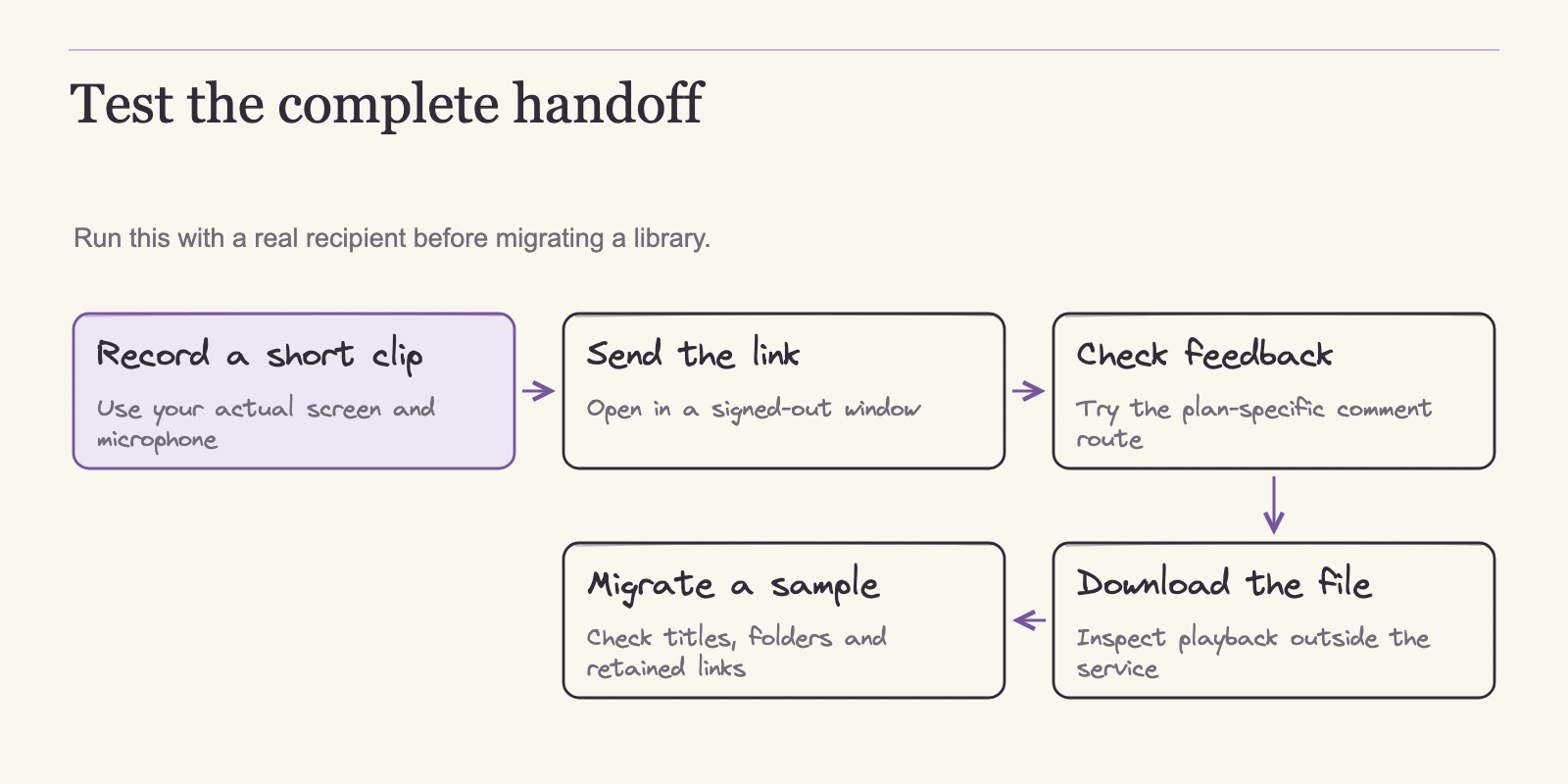
A sensible pre-switch sequence is: inventory what exists in the Loom account, download or import a small sample first and verify file playback, run the full export in batches because downloads cannot resume, confirm the destination's folder or playlist structure, and finally decide how long to keep old Loom links alive for viewers who already have them. The steps above are what a migration plan should include; they are not a report of a completed move.
With the loop understood and the library plan in place, the final choice narrows to the job the team actually ships.
Choosing by Job, Then Verifying Before You Switch
When class, platform, volume, and price filters are applied, the remaining choice depends on what the team actually ships. Four jobs dominate why teams look for Loom alternatives, and each narrows the field differently.
Quick asynchronous sharing, the daily walkthrough sent to a colleague, client, or stakeholder, needs the full hosted loop. Vidyard's paid tiers, Tella, and Cap Pro all document shareable-link workflows, so monthly volume and OS mix decide, not any inherent winner.
Polished tutorials and demos point to Screen Studio on macOS, which documents smooth cursor paths, hosted share links, and exports up to 4K at 60 fps. Mixed-OS teams should compare Tella or Cap Pro instead. Tella lists a native Windows recorder; Cap's Windows app is beta, and its Linux support requires glibc 2.39+. If the hard part is planning what to show before you press record, storyboarding a walkthrough before you record covers turning a product change into a shot list.
Local recording and control is the simplest fit. OBS is free, open-source capture and streaming software, and your team owns distribution, usually through Drive, Notion, or another hosting path you already run. That works when you ship finished files and do not need comment threads or transcripts inside the video tool. A team that prefers a licensed desktop recorder can buy Cap's commercial Desktop license and use the 25 cloud share links it includes per month, each up to five minutes; longer or higher-volume work needs another distribution path.
Sales outreach with analytics points to Vidyard Starter, with one caveat: CRM and MAP integrations appear on the Teams tier, not Starter, so Starter's value is analytics, viewer notifications, and branded, password-protected sharing. Founders sending recorded demos to prospects may also find founder demo diagrams that sell without sounding salesy useful for structuring the pitch.
| Reader job | Tools to shortlist | First thing to verify |
|---|---|---|
| Quick async sharing | Vidyard paid tiers, Tella, Cap Pro | Monthly volume caps versus team output |
| Polished tutorial or demo | Screen Studio (macOS); Tella or Cap Pro for mixed OS | Export formats and capture workflow |
| Local recording and control | OBS; Cap Desktop | Hosting and review path for finished files |
| Sales outreach with analytics | Vidyard Starter | Analytics and notification delivery on your plan; CRM integrations arrive at Teams |
Separate what you can confirm from the plan page from what only a hands-on run will answer. Confirm in the chosen plan the recording or link counts, the seat billing basis, storage terms, and the export formats listed for your tier. Then run one scripted trial covering the behaviors the pages do not settle: viewer sign-in and guest comment flow, transcript accuracy and retention, download and export fidelity for your exact files, and whether the plan's counters survive a full working month.
Each pass condition should be concrete: an external viewer opens the link without a registration wall, a comment lands next to the correct timestamp, an exported file plays in your archive tool, and the monthly counter matches the plan allowance. Record the dates and outputs of that trial; they become the evidence for the final call. Until then, treat the shortlist as promising, not proven.
Frequently Asked Questions
Which Loom alternative replaces the full workflow most directly?
The hosted class comes closest: Vidyard's paid tiers, Tella, and Cap Pro host shareable videos; the documented features for viewing, commenting, analytics, and downloading differ by plan, and several need a hands-on check. Screen Studio also provides hosted share links with timestamped comments, but only on macOS and with a 30-minute cap per shared recording. Match the shortlist to your volume caps and operating system mix, then verify sign-in and comment behavior in a trial.
Is OBS really free?
Yes. OBS is free and open-source recording and streaming software with no subscription fee. It provides capture, scene composition, and audio mixing, but it does not document a hosted sharing layer, comments, transcription, or analytics. Your team owns distribution and review, usually through Drive, Notion, or a self-hosted server.
Do viewers have to sign in to watch or comment?
The inspected pricing and product pages do not state that any of these tools require viewer sign-in, nor do they document guest comment paths. That makes this a hands-on check, not an asserted feature. Record a test video, send the link to someone outside your organization, and confirm who can watch, what they need to enter, and whether comments reach the uploader.
Can I download finished videos from these tools?
OBS writes local files directly. Screen Studio's export guide documents GIF and MP4 output up to 4K at 60 fps. Cap claims 4K, 60 fps, and broad format flexibility, and Tella lists video, audio, raw clip, and subtitle exports, though neither page details a complete codec list. Vidyard's download formats by plan are not itemized. Confirm the exact output you need before committing.
Does Screen Studio still offer a one-time license?
No. New one-time purchases are no longer available. Current options are the yearly plan displayed at $9 per month or $29 per month on monthly billing, with all features included on either. Historical perpetual licenses remain valid, and renewal is only needed for expired update access. Screen Studio also runs only on macOS.
What do the free tiers actually allow?
Cap Free is licensed for personal use and includes 25 cloud share links per month, each capped at five minutes; it does not include commercial use or unlimited local editing. Vidyard Free allows five ordinary recordings per month up to 30 minutes, plus a separate allowance of 15 AI videos. A team recording three walkthroughs a week produces about 13 recordings monthly, roughly 2.6 times Vidyard's free cap.
Conclusion
The five tools in this comparison all record video; the difference is what happens after the recording stops. A hosted workspace carries the video through sharing, viewing, response, retention, and download. A capture-only tool leaves your team to build that loop itself, which is legitimate when a hosting and review path already exists. Screen Studio sits between the two: it hosts share links and timed comments, but binds you to macOS and a 30-minute cap per shared recording.
Once you know which class matches your job, platform, volume, and price filters remove most candidates. What remains is a shortlist that needs proof, not more reading. Pick your highest-volume workflow and run one real recording through the two finalists this week: send the link to someone outside your organization, collect a comment, export the file, and watch whether the plan's counters survive the month.
While you do, start the Loom library inventory and run a sample through the transfer or importer route you chose, because preserving old videos is a separate job that does not wait for the new tool decision. The workflow that survives both tests is the one to keep.