AI design tools
Getting Work Out of Claude Design: Every Export and Hand-off Path, and What Each One Loses
Every documented way to get a Claude Design project out, what each route keeps or loses, and whether a direct Figma export exists yet.
· Diagram Studio Editorial
Direct answer
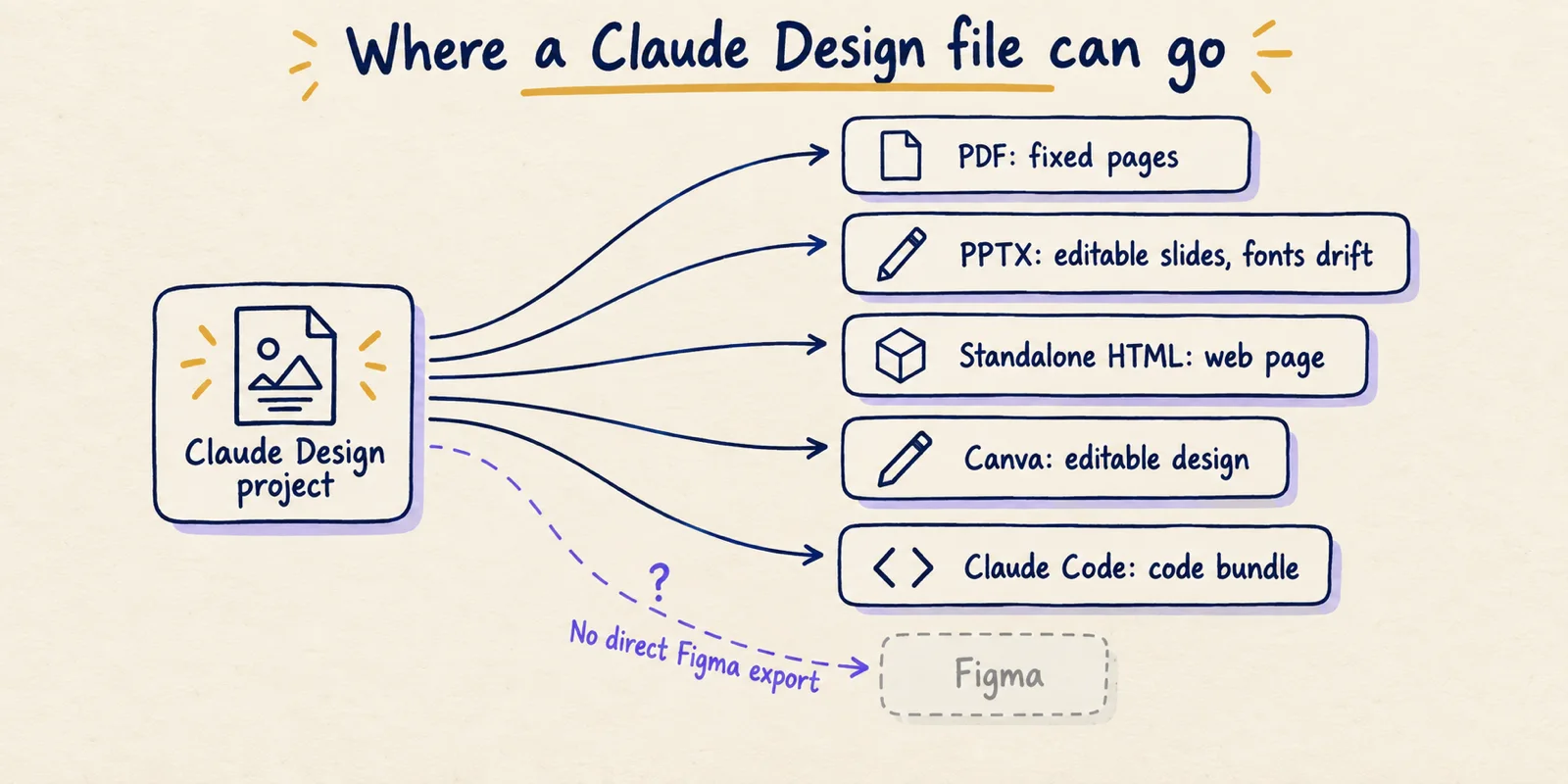
As of October 1, 2026, Claude Design exports to ZIP, PDF, PPTX, standalone HTML, Google Slides, partner tools such as Canva, or a Claude Code hand-off. Anthropic's documentation lists no direct Figma export; people convert standalone HTML with third-party tools. Every route converts the design, so check fonts, layout and editability after exporting.
The short answer: pick the export by what happens next
Claude Design, Anthropic's AI design product, can send a project to a ZIP, PDF, PPTX, standalone HTML, Google Slides, a list of partner tools including Canva, or Claude Code. It has no direct Figma export in Anthropic's own documentation, and reviewers writing between April and June 2026 say the same. Nothing is lossless, because each route converts something designed in a browser into a different kind of file.
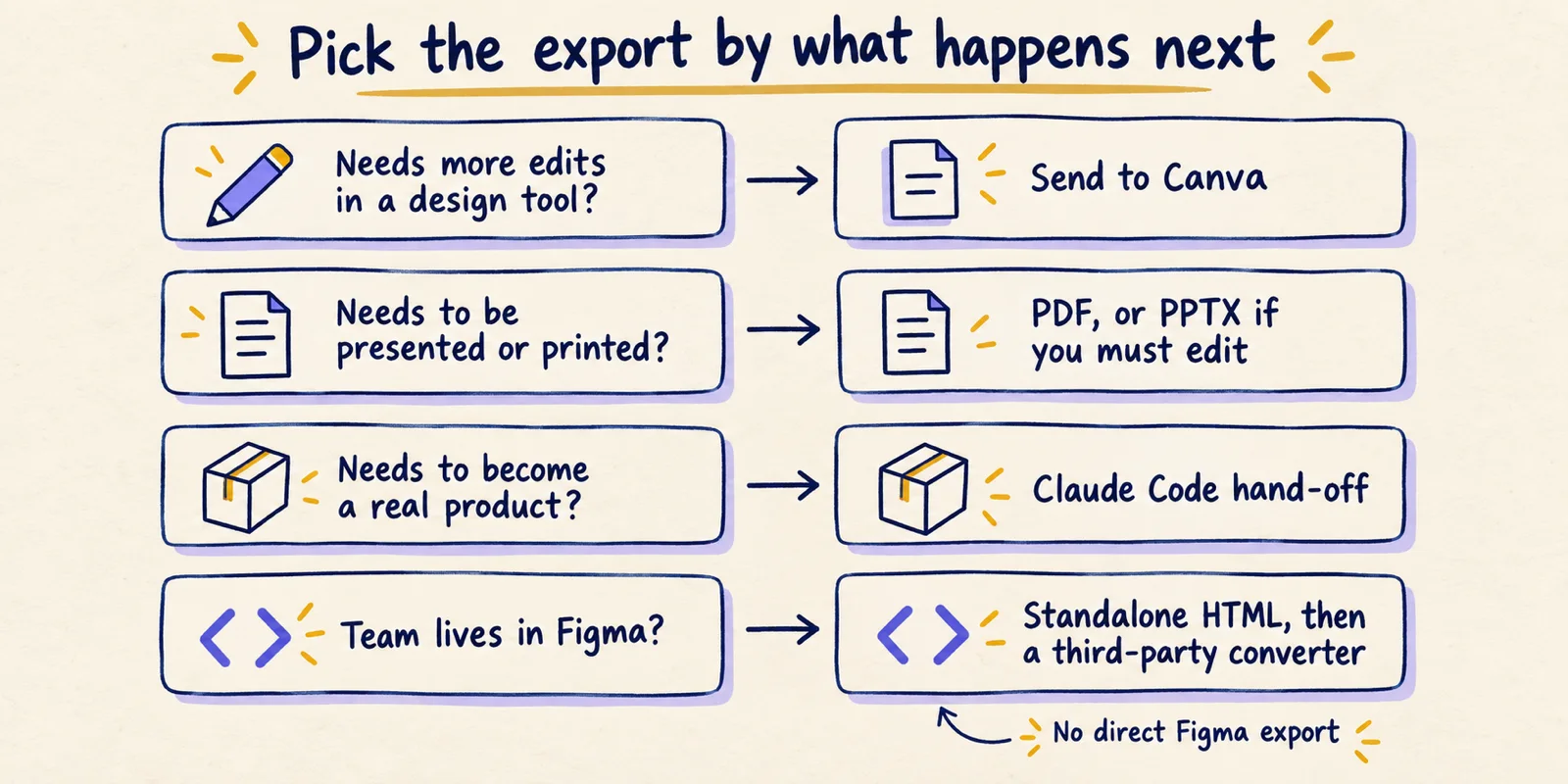
The useful question is not which format is best but what the file has to do next. If someone must keep editing the visuals, Canva or PPTX. If it must be read exactly as drawn, PDF. If it must become a working product, the Claude Code hand-off. If your team's source of truth is Figma, standalone HTML plus a third-party converter is the route people actually use, and it is a conversion rather than an export.
This article lists each documented route, what is known about what survives and what does not, and how Figma and Google Stitch handle the same job. Facts that change, such as export options and plan availability, are stated as of October 1, 2026 and may have changed since. Each is labelled documented (Anthropic or the other vendor's own page), reported (a named third party) or inference (our reading of the evidence). We did not export anything ourselves for this piece, so no fidelity claim below comes from our own testing.
Every documented way out, in one table
Anthropic's Get started with Claude Design help page, checked October 1, 2026, lists the Export button options below. Claude Design launched in April 2026 and its capabilities were folded into Claude conversations and the Artifacts tab on September 16, 2026 (release notes); the export list has been consistent across the launch post, the help page and the artifacts page.
| Route | What you get | What survives | Known losses or unknowns | Evidence |
|---|---|---|---|---|
| Share link (in Claude) | A link to the live project | Everything, because it is the project itself | Viewers need access; permissions are view, comment or edit. No version history yet | Documented |
| Download as .zip | A local package of the project | Source files; contents not itemised by Anthropic | Anthropic does not list the files inside | Documented (contents unknown) |
| Fixed pages | Layout as rendered | Reported: images or card styling sometimes come out wrong | Reported | |
| PPTX | PowerPoint file | Editable text boxes and shapes | Reported: fonts shift, wraps change, complex layouts drift | Reported |
| Standalone HTML | A single web page | Whatever a browser can run (inference) | Not editable in a design tool without conversion | Documented format, inference on fidelity |
| Google Slides | Slides deck | Not detailed | Only available at claude.ai/design | Documented |
| Partner tools (Canva and others) | A project opened in that tool | Canva reports editable files | Anthropic does not detail what each partner keeps | Documented list, reported fidelity |
| Claude Code hand-off | A bundle for a coding agent | Structure, tokens, assets (reported) | Anthropic does not detail the bundle | Documented route, reported contents |
| Figma | Not offered | Not applicable | Third-party converters only | Documented absence in Anthropic's lists; reported by reviewers |
The launch post also mentions saving designs as folders and sharing them as internal URLs. The current help page lists .zip instead of folders, so treat the folder wording as the older description of the same idea, not a separate format (inference).
PDF, PPTX and HTML: what each format actually keeps
These three are the formats most people reach for first, and the evidence on them is thin, mostly reviewers rather than Anthropic. Anthropic describes the options but not their fidelity.
PDF. A PDF is a fixed layout, so it is the right choice when the reader should see exactly one thing. The agency Very Good Ventures, writing on June 8, 2026 while Claude Design was in research preview, said PDF export "sometimes messes up images or elements like cards, with the styling coming out wrong" and advised a final review pass after any export. That is one reviewer's experience, not a measured failure rate, and the product has changed since.
PPTX. The same author said PPTX "usually opens fine in PowerPoint and Keynote, but complex layouts can drift on the way out." A separate June 20, 2026 write-up by Yuto Noguchi reports fonts shifting slightly and about one or two formatting discrepancies per slide, because the design is generated as HTML and converted, and the rendering engines measure text differently. His conclusion was that everything stayed editable and the fixes took a minute or two per deck. In both accounts the result is editable but not identical to the original (inference from the two reports).
Standalone HTML. HTML is the format closest to how Claude Design builds things, so it is the least lossy for anything that must still behave like a web page. That is an inference from the format, not something Anthropic or a reviewer measured. Its limit is that a designer cannot open it in a design tool and drag a layer. It is also the input every Figma conversion route starts from.
A practical rule that follows from these reports: if the layout matters to the pixel, export the format you can inspect quickly (PDF or HTML) and look at it before sending. If editing matters, accept drift and budget a short clean-up pass.
Sharing, Canva and the other partner tools
Sharing is the one route that loses nothing, because the recipient sees the project itself. Anthropic's help page says designs start private and can be shared so that people "can view, comment on, or edit it." The launch post described sharing as scoped to your organisation. If the person who needs the work is outside it, one of the file exports is the realistic route; Anthropic's pages we read do not describe external link sharing for designs, so check your own account.
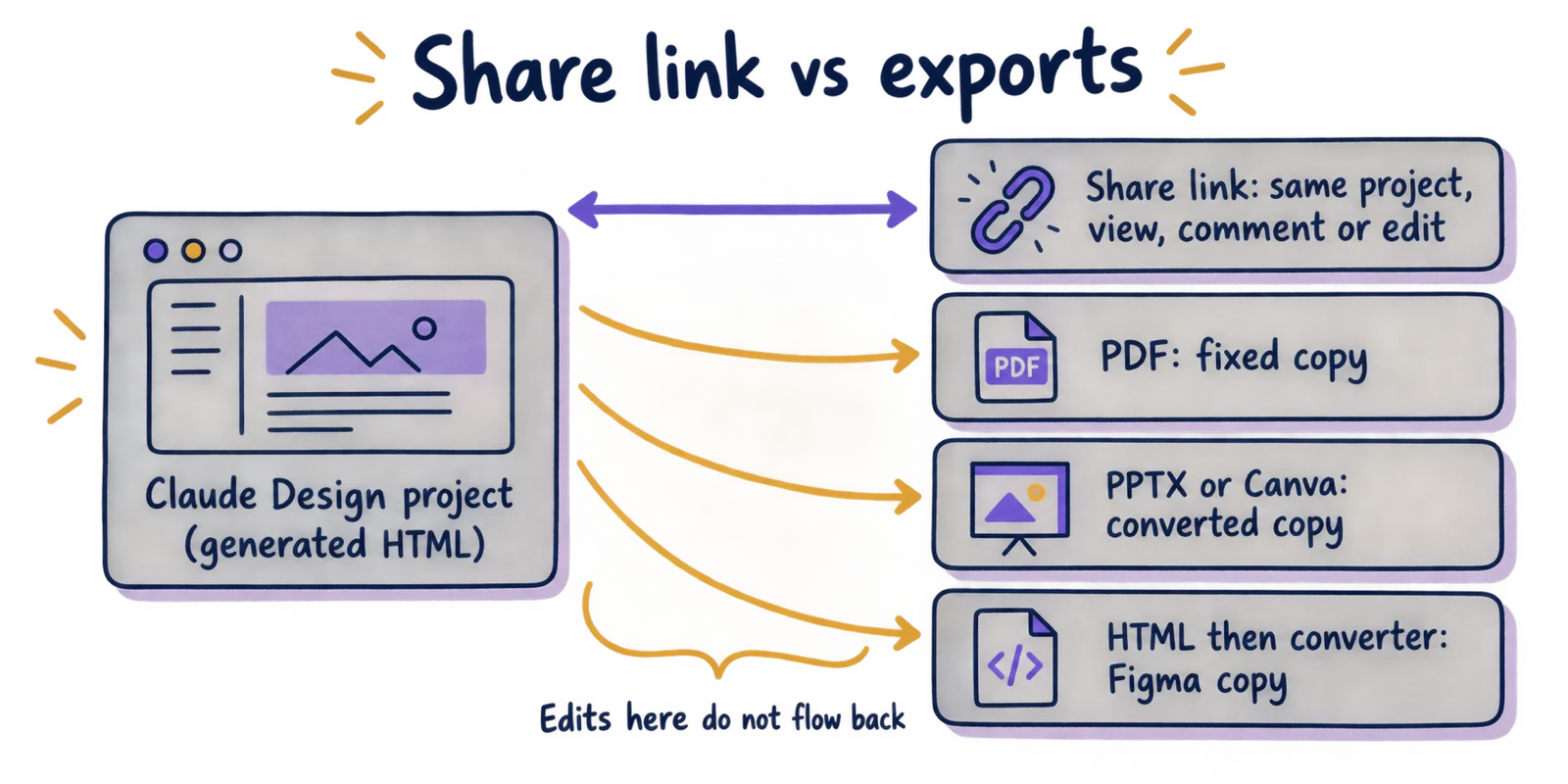
Anthropic also states that Claude Design "doesn't have version history yet" (help page). Since an export is a snapshot and the project can be regenerated, ask Claude to save the current version before trying a new direction, and keep the exported file as your record.
Canva. At launch Anthropic quoted Canva's CEO describing designs that "instantly become fully editable" in Canva. Anthropic does not publish a list of what Canva keeps, so confirm fonts and spacing on your first export.
Other partners. The help page lists Adobe Experience Manager, Adobe for Creativity, Adobe Journey Optimizer, Base44, Canva, Gamma, HubSpot, Hyperframes, Lovable, Miro, Netlify, Replit, v0, Vercel and Wix. These are destinations, not guarantees about what arrives. Treat each as a first-use experiment.
Designs have organization-scoped sharing. You can keep a document private, share it so anyone in your organization with the link can view it, or grant edit access so colleagues can modify the design and chat with Claude together in a group conversation.
The Claude Code hand-off, briefly
The hand-off is the route for turning a design into working software. Anthropic's launch post says that when a design is ready to build, "Claude packages everything into a handoff bundle that you can pass to Claude Code with a single instruction." The help page names two options, "Send to local coding agent" and "Send to Claude Code Web."
What is in the bundle is less clear. The help page does not itemise it. A third-party guide at claudefa.st reports that it carries component structure, design tokens, layout hierarchy and assets rather than a screenshot. Treat that as reported, not documented. A hand-off gives the coding agent more than an image, but it is still a starting point that developers review, and nothing in the export lets you round-trip changes back into the design.
The mechanics, prompts and failure modes get their own article: Claude Design to Claude Code hand-off. The only point to carry from here is that this route is a one-way trip to code, not an editable design file.
Is there a direct Figma export? Not as of October 1, 2026
We found no Figma option in Anthropic's export lists on the help page, the artifacts page or the launch post. Reviewers say the same: a May 18, 2026 review by Yiannis Antoniou calls the missing Figma export a dealbreaker for teams built around Figma and says exports cannot be edited and re-imported, and Anima's April 18, 2026 guide states there is no native Figma export. We also searched for a newer announcement and found none. Absence of an announcement is not proof, so check the Export menu in your own account.
Two things are easy to confuse with it. First, Figma and Anthropic announced on February 17, 2026 a feature that captures a running UI built in Claude Code and pastes it into Figma as editable frames (Figma's post). That goes from Claude Code to Figma, not from Claude Design. Second, third-party tools convert HTML into Figma layers. The html.to.design documentation lists a browser extension, a plugin and a published-URL import, and says it keeps layer hierarchy, editable text, colours as local styles, images and auto-layout, while CSS animations do not transfer and custom fonts may need installing. Anima describes a similar HTML-to-Figma route that, by its own account, loses interactivity. Both are vendors describing their own products, so these are reported claims.
How Figma and Google Stitch export, for comparison
The comparison is about where each tool's work can go, not which tool is better. Figma is a hand-edited design file; Claude Design and Stitch generate designs from prompts.
| Tool | Editable design file | Static output | Code or agent route | Notes |
|---|---|---|---|---|
| Claude Design | Canva (documented); Figma only via third-party conversion | PDF, PPTX, ZIP | Claude Code hand-off; standalone HTML | No version history yet (documented) |
| Figma | The Figma file is the source | PNG, JPG, SVG, PDF (documented) | Dev Mode code snippets in CSS, iOS and Android; variables; paid plans with a Full or Dev seat (documented) | SVG text becomes outlines by default, so it is no longer editable text (documented) |
| Google Stitch | Copy to Figma, which Google staff on its developer forum acknowledged appears intermittently (documented) | Not covered by sources read | MCP server, SDK and skills; exports to AI Studio and Antigravity; DESIGN.md design-rules format (documented) | HTML and CSS code export is reported by third-party reviews |
One structural difference matters more than the format lists. Figma and Stitch hold the design in a form a designer can edit, so exports are views of it. Claude Design's project is generated HTML, so a PPTX or Canva file is a translation, and the translation goes one way. Google also open-sourced the DESIGN.md format on April 21, 2026 so design rules can move between tools as plain text. That helps carry tokens, not layouts, and it is Google's description, not an independent measurement.
Claude reads your codebase and design files to build your team's design system, then applies it automatically, keeping every project on-brand.
— Claude (@claudeai) View on X
A pre-export check you can run in five minutes
Because fidelity depends on the file and the destination, a short routine beats picking a format by reputation. Work through it before you send anything to a client or a developer.
- Name the next step. Write one line: who opens this file, in which program, and what they will change.
- Choose the route from the table: Canva or PPTX for further editing, PDF for reading, HTML for the web, Claude Code for building, converter plus Figma for a Figma team.
- Ask Claude to save the current version, because the project has no version history.
- Export once, then open the file in the destination program, not a preview.
- Check three things: fonts (substitutions show up first in titles), text wrapping and image crops.
- Keep the share link or ZIP as the source, and treat the converted file as a copy.
- If the destination is Figma, re-check colours, auto-layout and fonts after conversion, and expect animations and interactivity not to carry over.
A worked example: a founder has a ten-slide pitch deck in Claude Design for a meeting tomorrow. The next step is presenting, so PDF is the safe file and PPTX the editable one. Export both, open the PPTX in the presenting machine's PowerPoint, and compare titles against the PDF. If fonts drifted, fix them by hand or present from the PDF. That check takes minutes and catches what the reviewers above describe.
What to take away
Claude Design gives you several exits, and each one trades something. Sharing keeps everything but needs the recipient to be inside Claude, PDF fixes the layout, PPTX and Canva keep it editable at the cost of drift, HTML stays a web page, and the Claude Code hand-off leads to code rather than to a design file. The Figma answer is the one most readers search for: as of October 1, 2026 there is no direct export in Anthropic's documentation, only third-party conversion from standalone HTML.
If your work is likely to travel, decide the destination before you start designing, run the check above on the first export, and keep the project link as the source of truth. When an export is the only route to the destination you need, test one on a real file before you promise a client a format.