Creative tools & workflows
Suno Pricing: Credits, Downloads, and What You Can Use Commercially
Suno pricing as of November 2026: credit and download allowances, annual savings, and commercial-use conditions. Free gives 50 daily credits.
· · Diagram Studio Editorial
Most people evaluating Suno look at the monthly price first. The number that should drive the decision is different: how many finished tracks you can actually take away and use. As of 4 November 2026, Suno’s pricing page lists Free at $0, Pro at $10 a month or $96 a year, and Premier at $30 a month or $288 a year.
Those figures are a USD snapshot before taxes. Behind them sit two separate meters, generation credits and song downloads, plus conditions that determine what you may do with a downloaded track. A paid allowance is not a guarantee of finished usable tracks. This guide is built from Suno’s public pricing, help pages, and terms, not from listening tests.
Direct answer
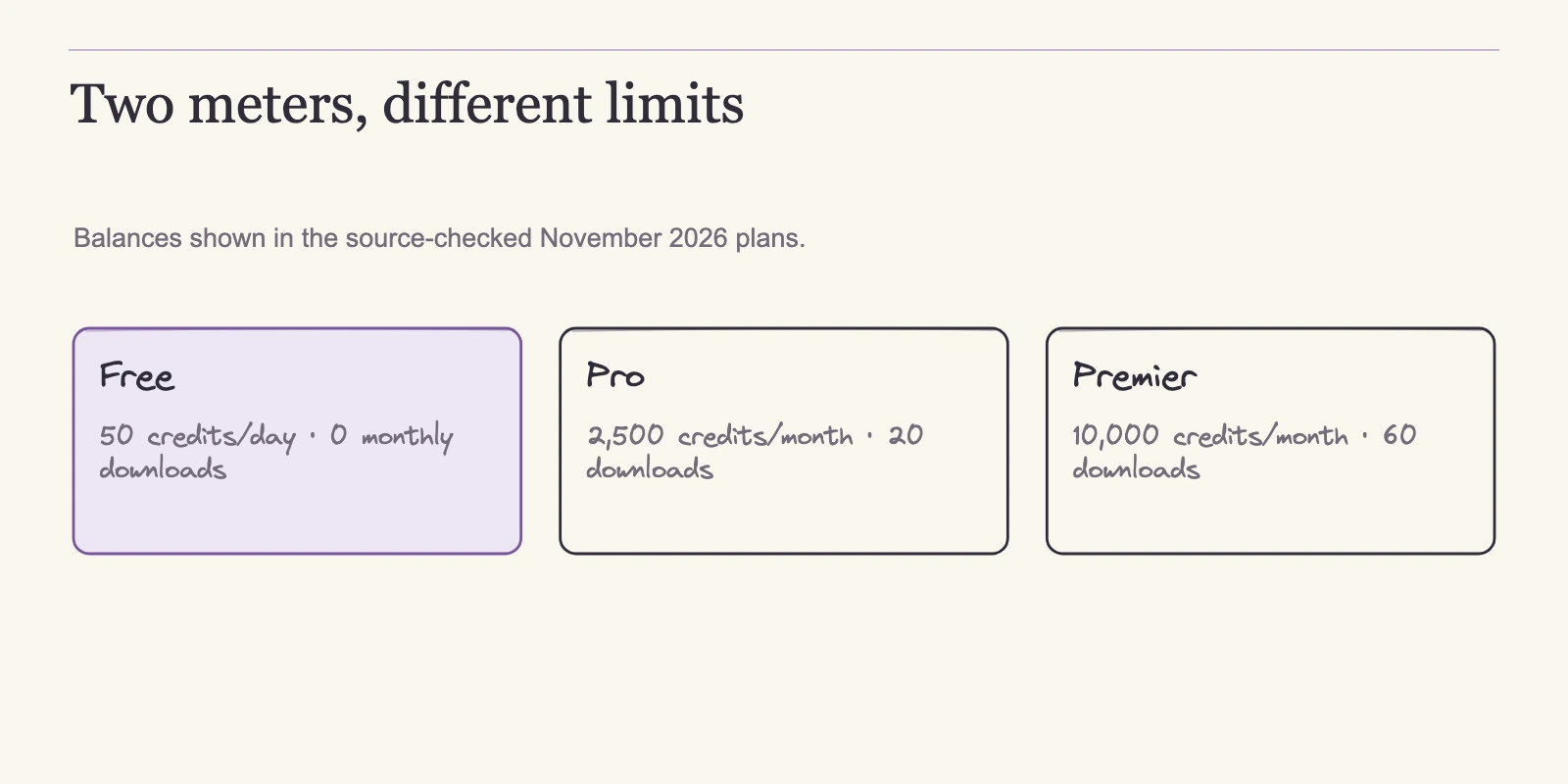
As of 4 November 2026, Suno Free gives 50 daily credits and up to seven lifetime noncommercial trial downloads where the account qualifies. Pro costs $10 a month or $96 a year for 2,500 monthly credits and 20 downloads. Premier costs $30 or $288 for 10,000 credits and 60 downloads. Credits and downloads are separate meters, and subscription allowances expire each cycle. Annual billing lowers the effective monthly rate to $8 and $24 without changing quotas. Songs downloaded while subscribed carry commercial use, subject to Suno's terms.
What Suno costs now
Each Suno plan runs two meters that do different jobs. Generation credits pay for attempts; song downloads pay for exports. The pricing page shows both numbers for every tier.
| Plan | Monthly billed | Annual upfront | Annual-equivalent label | Generation credits | Song downloads per month |
|---|---|---|---|---|---|
| Free | $0 | $0 | Not applicable | 50 per day | 0 included |
| Pro | $10 | $96 | $8 | 2,500 per month | 20 |
| Premier | $30 | $288 | $24 | 10,000 per month | 60 |
The annual labels describe the effective monthly cost of paying for a year upfront. They are not a cheaper monthly billing option. You commit for a year and pay more upfront in exchange for the lower effective rate.
Premier includes Suno Studio. Pro and Premier also offer additional-credit and additional-download purchases. The pricing page does not list prices for those add-ons, so this article does not quote them. The page also lists model access: v6-mini is available on all plans, while v6 and v6-wild are paid. Suno’s v6 FAQ confirms that split.
That table tells you what each plan contains, not how the allowances behave. The credit meter runs on its own clock, and the reset rules determine how much slack you actually have.
How generation credits work
Generation credits are the currency Suno draws from when it generates music. The credit reset help defines the rule that matters most: a reset restores a fixed balance, it does not add to whatever remains.
Free users get 50 credits per day, and the daily balance resets to 50. If you spend 30 credits on Monday, you begin Tuesday with 50 again, not 70. Paid tiers run on a monthly cycle. Pro resets to 2,500 credits at the start of each billing month, and Premier resets to 10,000. Leftover credits from the previous period are ignored.
| Tier | Cadence | Balance after reset |
|---|---|---|
| Free | Daily | 50 |
| Pro | Monthly | 2,500 |
| Premier | Monthly | 10,000 |
Subscription credits included with your plan do not carry over. At the end of the billing period, any unused balance disappears. Purchased top-up credits behave differently: they do not expire, but they require an active subscription to use, as the pricing page states. A Pro subscriber who buys extra credits and later lets the subscription lapse cannot spend those credits until the subscription is active again.
The credit balance is also not a song count. A standard generation action costs 10 credits and returns two candidate songs, according to Suno’s v6 cost FAQ. Many image and video inputs can raise the cost, and Max Mode costs more. So 50 credits means five standard generation actions yielding up to ten candidates, not 50 finished songs. How many of those candidates you accept, and how many retries you need, is not published.
Other actions consume credits separately. Auto Split can produce up to 12 stems for 50 credits per extraction on Pro and Premier. Split from Mix costs 10 credits per stem. Advanced Split costs 10 credits per stem and is Premier-only. Get MIDI costs 10 credits after stem extraction. These are documented rates for specific operations, and they belong in a budget as their own line.
A quick example shows how the clock feels. A Pro user who spends 1,000 credits in the first week keeps 1,500 until the billing date resets the balance to 2,500. A Free user who spends 40 credits on Monday morning has 10 left for the rest of the day and a fresh 50 the next morning.
Downloads: the second meter
Suno’s download rules changed in September 2026, and guides written before that date may still describe an older, unlimited-download model. The official change notice now sets monthly download limits: Pro includes 20 song downloads per month, Premier includes 60, and Free includes none. The download quota help matches that structure.
| Plan | Monthly downloads | Notes |
|---|---|---|
| Free | 0 included | Up to seven lifetime trial downloads, noncommercial |
| Pro | 20 | Resets each billing month; unused allowances expire |
| Premier | 60 | Resets each billing month; unused allowances expire |
The Free tier needs a precise description. The pricing card lists no monthly downloads, but Suno’s Free download help documents a separate path: qualifying Free accounts may download up to seven songs over the account’s lifetime for trial purposes, and those downloads are noncommercial. Availability can vary by account, so check yours before planning around it. Free accounts can also purchase additional downloads after using the trial allowance, according to Suno’s download purchase help. No recurring included allowance is not the same as no route to export more.
Downloads are distinct from listening and sharing. Playing a track in the app or sharing it does not touch the download quota. The meter moves only when you export a file.
The same help pages include one exception: Suno Studio workflows are unaffected by these download limits. That statement covers documented Studio workflows. It does not extend to every export path a Studio user could take.
The practical effect is that Suno now has two bottlenecks instead of one. A Pro subscriber can spend 2,500 credits on attempts in a month yet export only 20 songs. For someone finishing a few tracks a month, that is usually ample. For a workflow that archives many distinct songs or delivers many separate assets, the download meter binds first.
What counts as one download
Suno’s download quota help defines what drains the meter, and the rules reward deliberate exporting. The core rule is that one song counts as one download no matter how many files you request for it.
| Action | Counted downloads |
|---|---|
| Same song in several formats | 1 |
| Re-download of the same song | 1 |
| Song plus its included stems | 1 |
| Interrupted or failed download | 0 |
Count distinct quota-consuming song assets, not exported files. If a separate alternate mix is its own Suno song asset, it consumes another download. A different format of the same song does not. Included stems do not count as extra downloads, and re-downloading a song counts only once.
The practical consequence is to plan exports in one pass. Because requesting extra formats or re-downloading later still counts as the same single download, gathering every file you need in one pass costs no extra allowance and removes the risk of losing a file before the monthly reset. Suno Music’s official tutorial walks through the download and library interface behind these counts.
Rollover rules come from a separate help page and follow their own logic. Unused subscription download allowances expire at the end of each billing cycle; they do not carry over. Purchased individual downloads and download packs do roll over, so a paid top-up stays available until you spend it. Trial downloads on the Free tier carry forward but never replenish; the seven lifetime downloads do not refresh.
Annual subscribers receive their download allowance monthly, not all at once. A Pro subscriber paying $96 for the year receives 20 downloads in each month of the subscription, not 240 at once. That mirrors the credit rhythm: annual billing changes the price, not the monthly cadence of either meter.
When downloads carry commercial use
A paid plan does not automatically clear every use of a track. Suno’s paid subscription rights help scopes commercial rights to songs downloaded while subscribed. Distribution, monetization, and film/TV/game use are listed as examples, subject to Suno’s terms. Those examples show what the permission is meant to enable, not a promise that every planned use is automatically cleared.
Free and basic output remains personal and noncommercial. The governing terms require commercial exploitation to start from a permitted download through an approved Suno channel. Obtaining copies by stream ripping or recording is prohibited. The official download flow therefore doubles as the source of the commercial-use permission described in the help page.
Current help also distinguishes remixes. Original creators remixing their own work may qualify commercially using a paid-plan download credit, including when the original was made without a subscription, according to Suno’s own-work remix guidance. Remixes of someone else’s work are not eligible for monetization. The governing terms define a separate collaborative Remix category involving other users and keep that category noncommercial. Do not flatten all of this into a single rule: an own-work editing workflow is not automatically the same as a collaborative Remix, and neither is a blanket commercial license.
Suno’s older retroactive licensing help notes that subscribing does not by default retroactively license songs made on Free, though specific exceptions may be offered. If you have older free files, check the current policy rather than assuming a later subscription clears them. A Free account can buy extra downloads, but the commercial-use wording in the paid-rights help centers on songs downloaded while subscribed, so verify the license tied to a purchased Free-account download before relying on it.
The terms state that commercial-use rights for an eligible permitted download persist after later quota or pricing changes and after subscription expiry, cancellation, downgrade, or suspension. A track downloaded while subscribed can remain in commercial use after you cancel. That is Suno’s contractual position, not legal advice, and the terms do not warrant that copyright vests in any output. Paying does not mean owning a registered copyright or holding unqualified exclusivity.
Budgeting by release cadence
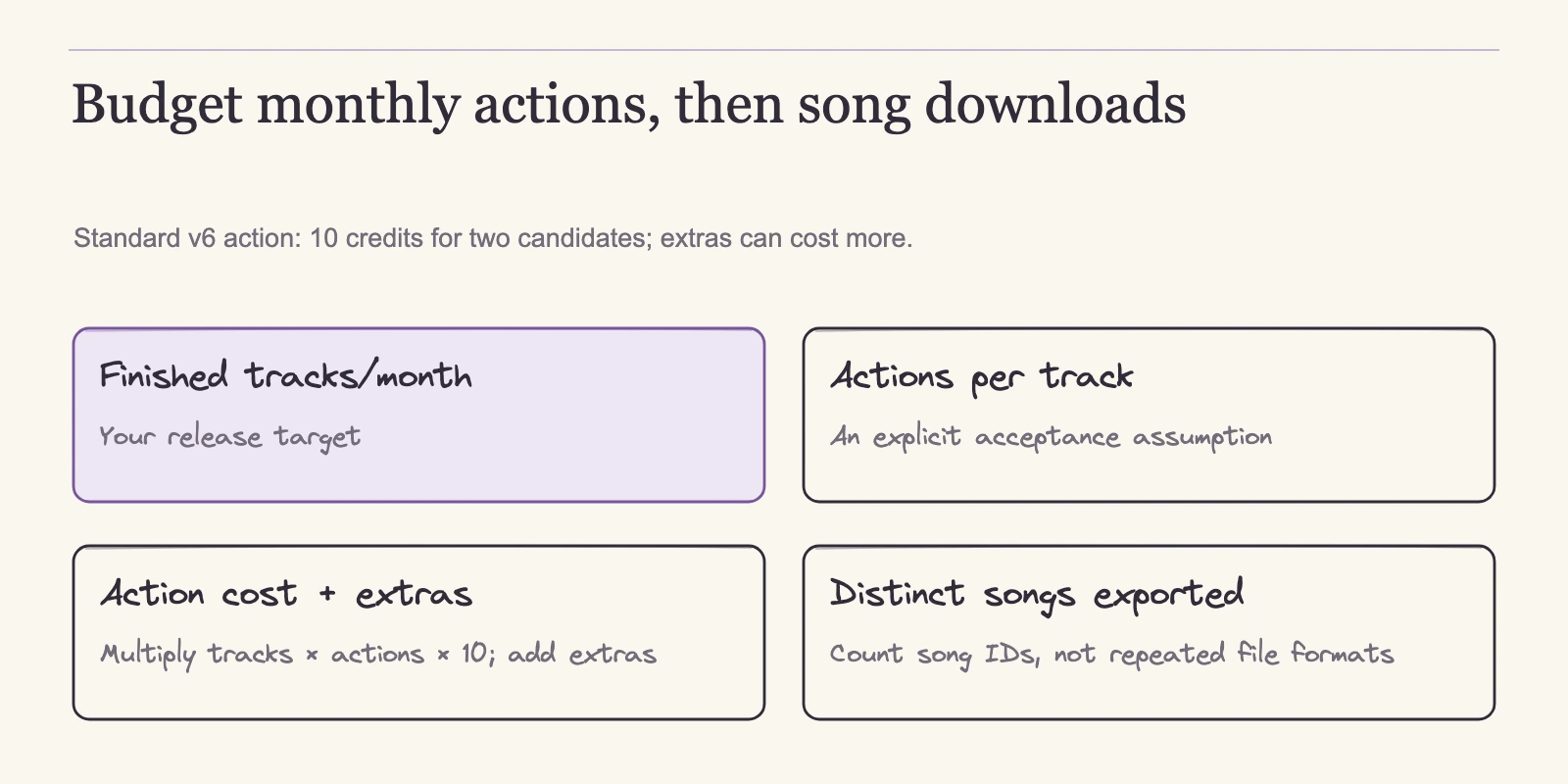
With meters and rights in place, planning becomes arithmetic. The prices, allowances, and per-action costs above come from Suno’s pages. The scenario numbers below are planning assumptions, not measurements; no Suno audio was generated or listened to for this article. Substitute your own observed counts before treating anything as a budget.
Use two formulas:
Credits needed per month ≈ (generation actions per finished track × finished tracks per month × 10) + extra-operation credits per month Downloads needed per month = distinct quota-consuming song assets exported per month
The credit formula includes the monthly finished-track count. Extra-operation credits are a monthly total, not a per-track figure, and they cover stem extraction, MIDI, or other paid actions. The download side counts distinct song assets, not file formats or included stems.
A few worked scenarios show how the formulas behave. Each scenario assumes a standard generation action at 10 credits for two candidate songs.
One finished track per month. Assume 10 generation actions to land one accepted track, including discarded candidates and retries. Credits used: 1 × 10 × 10 = 100. Downloads used: 1. Free’s daily 50-credit reset covers that generation volume if you spread the actions across days, and a qualifying Free account can use one of its seven lifetime trial downloads. Free output is noncommercial, so for any commercial release Pro is the floor.
Four finished tracks per month. Assume 10 generation actions per accepted track. Credits used: 4 × 10 × 10 = 400. Downloads used: 4. Pro covers the credits with 2,100 to spare and uses 4 of its 20 downloads. Pro fits comfortably.
Ten finished tracks per month with stem extraction. Assume 20 generation actions per accepted track and Auto Split on each of the 10 tracks. Credits used: (10 × 20 × 10) + (10 × 50) = 2,500. Downloads used: 10, because included stems do not consume extra downloads. Pro sits exactly at its monthly credit ceiling, leaving no room for an extra retry, an image or video input that raises per-action cost, or a Max Mode action. Premier provides margin. If your real action count is lower, Pro may still fit; if it is higher, Premier becomes the safer choice.
| Scenario | Assumed actions per finished track | Credits used | Downloads used | Plan fit |
|---|---|---|---|---|
| 1 track/month | 10 | 100 | 1 | Free noncommercial; Pro if commercial |
| 4 tracks/month | 10 | 400 | 4 | Pro |
| 10 tracks/month with stem extraction | 20 | 2,500 | 10 | Pro at ceiling; Premier for margin |
The binding meter is the one you hit first. If you regularly need more than 20 distinct song downloads per month, Pro’s download cap binds regardless of credits, and the realistic options are Premier or purchased additional downloads. Suno’s pricing page does not quote add-on pack prices, so compare the current checkout price before choosing between them. Do not count file formats or included stems as extra downloads when making that comparison.
Monthly vs annual billing
Once the scenario arithmetic suggests a tier, the last decision is how to pay for it. Suno’s pricing page shows the paid plans two ways: $10 per month for Pro and $30 per month for Premier, or $96 and $288 paid upfront for a year. The annual figures divide down to effective monthly costs of $8 and $24. $96 ÷ 12 = $8, and $288 ÷ 12 = $24.
| Plan | Monthly billed over 12 months | Annual upfront | You save | Effective monthly cost |
|---|---|---|---|---|
| Pro | $120 | $96 | $24 | $8 |
| Premier | $360 | $288 | $72 | $24 |
Choosing annual billing saves $24 on Pro and $72 on Premier, about 20% of the monthly-billed total for both plans. Tax and regional differences can move the exact checkout amounts, and account-specific or legacy-plan differences can apply, so treat the 20% as a planning figure rather than a quotation.
What annual billing does not buy is more capacity. Suno’s rollover help confirms that annual plans receive their download allotment on each monthly billing anniversary, not the full year’s allowance in one grant. Generation credits reset on the same monthly rhythm. Prepaying therefore lowers the effective rate and settles this year’s price in advance. It does not enlarge the credits, the downloads, or any other plan allowance.
That distinction makes the billing choice a cash-flow question. If the tier is settled and the upfront outlay fits your budget, annual billing is simply the cheaper way to buy the same capacity. If you are still testing whether Suno fits your workflow, monthly billing costs more across twelve months but lets you stop after one or two cycles without forfeiting prepaid months. The allowance rhythm stays identical either way, so neither payment style fixes an underestimated workload.
Frequently asked questions about Suno pricing
Does Suno have a free plan?
Yes. Free resets to 50 generation credits daily and includes no monthly downloads, though qualifying accounts can receive up to seven lifetime noncommercial trial downloads and can also purchase additional downloads. Free and basic output is personal and noncommercial. If you need regular commercial use, a permitted download made while subscribed is the starting point.
Do generation credits roll over?
Subscription credits do not carry over. Pro and Premier reset monthly to 2,500 and 10,000 respectively. Purchased top-up credits do not expire, but they require an active subscription. A standard generation action costs 10 credits for two candidate songs, so balances buy actions, not guaranteed finished songs.
Do unused downloads carry over?
Unused subscription download allowances expire each billing cycle. Annual subscribers receive their allowance on each monthly anniversary rather than all at once. Purchased individual downloads and download packs roll over; trial downloads carry forward but do not replenish.
Can I use Suno songs commercially on a paid plan?
Songs downloaded while subscribed carry Suno’s commercial-use permission subject to its terms, with distribution, monetization, and film/TV/game use named as examples. That permission is not a copyright warranty. Original creators remixing their own work may qualify commercially using a paid-plan download credit; remixes of another creator’s work do not.
What happens to commercial-use rights if I cancel?
Suno’s terms state that commercial-use rights for an eligible permitted download persist after subscription expiry, cancellation, downgrade, or suspension. The condition applies to downloads made while subscribed. This is a contractual position, not legal advice, and it does not warrant copyright ownership.
Is annual billing worth it?
Pro annual billing costs $96 versus $120 over twelve monthly payments, and Premier costs $288 versus $360. Both save about 20%, bringing effective monthly costs to $8 and $24. Quotas replenish monthly regardless, so annual billing is a cash-flow choice, not a capacity upgrade.
Make the call: tier first, then billing
There is no single best Suno plan because the limiting resource depends on how you work. The plan that fits is the one whose least generous meter still covers the tracks you finish. Credits bound how many generation actions you can take. Downloads bound how many distinct song assets you can export. The terms bound what you can do with those files.
Start with your actual releases. Write down how many finished tracks you need in a month, how many generation actions each one typically takes, and which extra operations you will run. Enter those numbers in the credit and download formulas. The first allowance you hit is the constraint that selects the tier. Free works for noncommercial exploration, Pro serves most modest release schedules, and Premier earns its price when credits or downloads consistently run out. If only one meter needs occasional overflow, compare the current add-on purchase price against a tier upgrade before paying.
Then choose the payment rhythm. If you are confident in the workflow, annual billing saves 20% without changing any monthly allowance. If your numbers are still changing, pay monthly until you have a few cycles of real usage to measure. The worksheet takes a few minutes and replaces guesswork with a decision tied to the releases you actually plan to ship.